
Effective Modules
A more ergonomic way to write Effective code
(Note: this article assumes familiarity with TypeScript, Effect, and SOLID).
To jump straight to the tool I built, click here.
Since late 2025, I’ve been moving all my personal projects over to Effect, along with several work projects at Flexport (before getting laid off a couple months ago). I’ve come to largely agree with the premise that Effect is
the missing TypeScript standard library
- algebraic data types
- return types encoding error information
- exhaustive pattern matching
- first-class dependency injection
- type-safe schema decoding
In 2026, serious developers who understand the value of a strongly-typed language consider all these table stakes for a robust, type-safe programming platform. All these are missing from vanilla TypeScript. A comprehensive standard library should include all these features, and Effect has done it for the TypeScript ecosystem, arguably outdoing the ecosystem alternatives on every front. Effect has brought DI into the type system. That is, there is a compile-time failure when required dependencies aren’t provided. In general, few DI systems across all major programming languages offer this highest level of correctness.
So, Effect seems like the right choice for writing TypeScript at scale. However, as I adopt Effect conventions and constructs such as Service, Context, and Layer across my projects, I keep running into the same awkward developer experiences.
Headaches
1. Decoupling Impl from Interface
In Effect v3, we are encouraged to use the Effect.Service utility to improve code succinctness. Provide a default implementation of a Service and its interface gets inferred.
import { import EffectEffect } from "effect";
import { import FileSystemFileSystem } from "@effect/platform";
import { import NodeFileSystemNodeFileSystem } from "@effect/platform-node"
class class CacheCache extends import EffectEffect.const Service: <Cache>() => {
<Key, Make>(key: Key, make: Make): Effect.Service.Class<Cache, Key, Make>;
<Key, Make>(key: Key, make: Make): Effect.Service.Class<Cache, Key, Make>;
<Key, Make>(key: Key, make: Make): Effect.Service.Class<Cache, Key, Make>;
<Key, Make>(key: Key, make: Make): Effect.Service.Class<Cache, Key, Make>;
<Key, Make>(key: Key, make: Make): Effect.Service.Class<...>;
}
Simplifies the creation and management of services in Effect by defining both
a Tag and a Layer.
Details
This function allows you to streamline the creation of services by combining
the definition of a Context.Tag and a Layer in a single step. It supports
various ways of providing the service implementation:
- Using an
effect to define the service dynamically.
- Using
sync or succeed to define the service statically.
- Using
scoped to create services with lifecycle management.
It also allows you to specify dependencies for the service, which will be
provided automatically when the service is used. Accessors can be optionally
generated for the service, making it more convenient to use.
Example
import { Effect } from 'effect';
class Prefix extends Effect.Service<Prefix>()("Prefix", {
sync: () => ({ prefix: "PRE" })
}) {}
class Logger extends Effect.Service<Logger>()("Logger", {
accessors: true,
effect: Effect.gen(function* () {
const { prefix } = yield* Prefix
return {
info: (message: string) =>
Effect.sync(() => {
console.log(`[${prefix}][${message}]`)
})
}
}),
dependencies: [Prefix.Default]
}) {}
Service<class CacheCache>()("app/Cache", {
// Define how to create the service
effect: Effect.Effect<{
readonly lookup: (key: string) => Effect.Effect<string, PlatformError, never>;
}, never, FileSystem.FileSystem>
import EffectEffect.const gen: <YieldWrap<Tag<FileSystem.FileSystem, FileSystem.FileSystem>>, {
readonly lookup: (key: string) => Effect.Effect<string, PlatformError, never>;
}>(f: (resume: Effect.Adapter) => Generator<YieldWrap<Tag<FileSystem.FileSystem, FileSystem.FileSystem>>, {
readonly lookup: (key: string) => Effect.Effect<string, PlatformError, never>;
}, never>) => Effect.Effect<{
readonly lookup: (key: string) => Effect.Effect<string, PlatformError, never>;
}, never, FileSystem.FileSystem> (+1 overload)
Provides a way to write effectful code using generator functions, simplifying
control flow and error handling.
When to Use
Effect.gen allows you to write code that looks and behaves like synchronous
code, but it can handle asynchronous tasks, errors, and complex control flow
(like loops and conditions). It helps make asynchronous code more readable
and easier to manage.
The generator functions work similarly to async/await but with more
explicit control over the execution of effects. You can yield* values from
effects and return the final result at the end.
Example
import { Effect } from "effect"
const addServiceCharge = (amount: number) => amount + 1
const applyDiscount = (
total: number,
discountRate: number
): Effect.Effect<number, Error> =>
discountRate === 0
? Effect.fail(new Error("Discount rate cannot be zero"))
: Effect.succeed(total - (total * discountRate) / 100)
const fetchTransactionAmount = Effect.promise(() => Promise.resolve(100))
const fetchDiscountRate = Effect.promise(() => Promise.resolve(5))
export const program = Effect.gen(function* () {
const transactionAmount = yield* fetchTransactionAmount
const discountRate = yield* fetchDiscountRate
const discountedAmount = yield* applyDiscount(
transactionAmount,
discountRate
)
const finalAmount = addServiceCharge(discountedAmount)
return `Final amount to charge: ${finalAmount}`
})
gen(function* () {
const const fs: FileSystem.FileSystemfs = yield* import FileSystemFileSystem.const FileSystem: Tag<FileSystem.FileSystem, FileSystem.FileSystem>FileSystem;
const const lookup: (key: string) => Effect.Effect<string, PlatformError, never>lookup = (key: stringkey: string) => const fs: FileSystem.FileSystemfs.FileSystem.readFileString: (path: string, encoding?: string) => Effect.Effect<string, PlatformError>Read the contents of a file.
readFileString(`cache/${key: stringkey}`);
return { lookup: (key: string) => Effect.Effect<string, PlatformError, never>lookup } as type const = {
readonly lookup: (key: string) => Effect.Effect<string, PlatformError, never>;
}
dependencies: readonly [Layer<FileSystem.FileSystem, never, never>]dependencies: [import NodeFileSystemNodeFileSystem.const layer: Layer<FileSystem.FileSystem, never, never>layer]
}) {}
import EffectEffect.const gen: <YieldWrap<Tag<Cache, Cache>> | YieldWrap<Effect.Effect<string, PlatformError, never>>, void>(f: (resume: Effect.Adapter) => Generator<YieldWrap<Tag<Cache, Cache>> | YieldWrap<Effect.Effect<string, PlatformError, never>>, void, never>) => Effect.Effect<void, PlatformError, Cache> (+1 overload)Provides a way to write effectful code using generator functions, simplifying
control flow and error handling.
When to Use
Effect.gen allows you to write code that looks and behaves like synchronous
code, but it can handle asynchronous tasks, errors, and complex control flow
(like loops and conditions). It helps make asynchronous code more readable
and easier to manage.
The generator functions work similarly to async/await but with more
explicit control over the execution of effects. You can yield* values from
effects and return the final result at the end.
Example
import { Effect } from "effect"
const addServiceCharge = (amount: number) => amount + 1
const applyDiscount = (
total: number,
discountRate: number
): Effect.Effect<number, Error> =>
discountRate === 0
? Effect.fail(new Error("Discount rate cannot be zero"))
: Effect.succeed(total - (total * discountRate) / 100)
const fetchTransactionAmount = Effect.promise(() => Promise.resolve(100))
const fetchDiscountRate = Effect.promise(() => Promise.resolve(5))
export const program = Effect.gen(function* () {
const transactionAmount = yield* fetchTransactionAmount
const discountRate = yield* fetchDiscountRate
const discountedAmount = yield* applyDiscount(
transactionAmount,
discountRate
)
const finalAmount = addServiceCharge(discountedAmount)
return `Final amount to charge: ${finalAmount}`
})
gen(function*() {
const const cache: Cachecache = yield* class CacheCache;
yield* const cache: Cachecache.lookup: (key: string) => Effect.Effect<string, PlatformError, never>lookup("some key");
});While this does improve readability (compared to declaring the Tag and Layer separately), the trade-off is violation of a sacred SOLID pillar, the Dependency Inversion principle, which mandates that maintainable code ought to depend on abstractions, not concretions. If a bug is introduced into the implementation, a compiler error should ideally appear in the implementation block and the interface should not change. But with Effect.Service an error may instead appear in client code because changing the implementation might inadvertently also change the interface.
class class CacheCache extends import EffectEffect.const Service: <Cache>() => {
<Key, Make>(key: Key, make: Make): Effect.Service.Class<Cache, Key, Make>;
<Key, Make>(key: Key, make: Make): Effect.Service.Class<Cache, Key, Make>;
<Key, Make>(key: Key, make: Make): Effect.Service.Class<Cache, Key, Make>;
<Key, Make>(key: Key, make: Make): Effect.Service.Class<Cache, Key, Make>;
<Key, Make>(key: Key, make: Make): Effect.Service.Class<...>;
}
Simplifies the creation and management of services in Effect by defining both
a Tag and a Layer.
Details
This function allows you to streamline the creation of services by combining
the definition of a Context.Tag and a Layer in a single step. It supports
various ways of providing the service implementation:
- Using an
effect to define the service dynamically.
- Using
sync or succeed to define the service statically.
- Using
scoped to create services with lifecycle management.
It also allows you to specify dependencies for the service, which will be
provided automatically when the service is used. Accessors can be optionally
generated for the service, making it more convenient to use.
Example
import { Effect } from 'effect';
class Prefix extends Effect.Service<Prefix>()("Prefix", {
sync: () => ({ prefix: "PRE" })
}) {}
class Logger extends Effect.Service<Logger>()("Logger", {
accessors: true,
effect: Effect.gen(function* () {
const { prefix } = yield* Prefix
return {
info: (message: string) =>
Effect.sync(() => {
console.log(`[${prefix}][${message}]`)
})
}
}),
dependencies: [Prefix.Default]
}) {}
Service<class CacheCache>()("app/Cache", {
effect: Effect.Effect<{
readonly lockup: (key: string) => Effect.Effect<string, PlatformError, never>;
}, never, FileSystem.FileSystem>
import EffectEffect.const gen: <YieldWrap<Tag<FileSystem.FileSystem, FileSystem.FileSystem>>, {
readonly lockup: (key: string) => Effect.Effect<string, PlatformError, never>;
}>(f: (resume: Effect.Adapter) => Generator<YieldWrap<Tag<FileSystem.FileSystem, FileSystem.FileSystem>>, {
readonly lockup: (key: string) => Effect.Effect<string, PlatformError, never>;
}, never>) => Effect.Effect<{
readonly lockup: (key: string) => Effect.Effect<string, PlatformError, never>;
}, never, FileSystem.FileSystem> (+1 overload)
Provides a way to write effectful code using generator functions, simplifying
control flow and error handling.
When to Use
Effect.gen allows you to write code that looks and behaves like synchronous
code, but it can handle asynchronous tasks, errors, and complex control flow
(like loops and conditions). It helps make asynchronous code more readable
and easier to manage.
The generator functions work similarly to async/await but with more
explicit control over the execution of effects. You can yield* values from
effects and return the final result at the end.
Example
import { Effect } from "effect"
const addServiceCharge = (amount: number) => amount + 1
const applyDiscount = (
total: number,
discountRate: number
): Effect.Effect<number, Error> =>
discountRate === 0
? Effect.fail(new Error("Discount rate cannot be zero"))
: Effect.succeed(total - (total * discountRate) / 100)
const fetchTransactionAmount = Effect.promise(() => Promise.resolve(100))
const fetchDiscountRate = Effect.promise(() => Promise.resolve(5))
export const program = Effect.gen(function* () {
const transactionAmount = yield* fetchTransactionAmount
const discountRate = yield* fetchDiscountRate
const discountedAmount = yield* applyDiscount(
transactionAmount,
discountRate
)
const finalAmount = addServiceCharge(discountedAmount)
return `Final amount to charge: ${finalAmount}`
})
gen(function* () {
const const fs: FileSystem.FileSystemfs = yield* import FileSystemFileSystem.const FileSystem: Tag<FileSystem.FileSystem, FileSystem.FileSystem>FileSystem;
// Accidentally changed the spelling of "lookup" to "lockup"
const const lockup: (key: string) => Effect.Effect<string, PlatformError, never>lockup = (key: stringkey: string) => const fs: FileSystem.FileSystemfs.FileSystem.readFileString: (path: string, encoding?: string) => Effect.Effect<string, PlatformError>Read the contents of a file.
readFileString(`cache/${key: stringkey}`);
return { lockup: (key: string) => Effect.Effect<string, PlatformError, never>lockup } as type const = {
readonly lockup: (key: string) => Effect.Effect<string, PlatformError, never>;
}
dependencies: readonly [Layer<FileSystem.FileSystem, never, never>]dependencies: [import NodeFileSystemNodeFileSystem.const layer: Layer<FileSystem.FileSystem, never, never>layer]
}) {}
import EffectEffect.const gen: <any, void>(f: (resume: Effect.Adapter) => Generator<any, void, never>) => Effect.Effect<void, unknown, unknown> (+1 overload)Provides a way to write effectful code using generator functions, simplifying
control flow and error handling.
When to Use
Effect.gen allows you to write code that looks and behaves like synchronous
code, but it can handle asynchronous tasks, errors, and complex control flow
(like loops and conditions). It helps make asynchronous code more readable
and easier to manage.
The generator functions work similarly to async/await but with more
explicit control over the execution of effects. You can yield* values from
effects and return the final result at the end.
Example
import { Effect } from "effect"
const addServiceCharge = (amount: number) => amount + 1
const applyDiscount = (
total: number,
discountRate: number
): Effect.Effect<number, Error> =>
discountRate === 0
? Effect.fail(new Error("Discount rate cannot be zero"))
: Effect.succeed(total - (total * discountRate) / 100)
const fetchTransactionAmount = Effect.promise(() => Promise.resolve(100))
const fetchDiscountRate = Effect.promise(() => Promise.resolve(5))
export const program = Effect.gen(function* () {
const transactionAmount = yield* fetchTransactionAmount
const discountRate = yield* fetchDiscountRate
const discountedAmount = yield* applyDiscount(
transactionAmount,
discountRate
)
const finalAmount = addServiceCharge(discountedAmount)
return `Final amount to charge: ${finalAmount}`
})
gen(function*() {
const const cache: Cachecache = yield* class CacheCache;
yield* const cache: Cachecache.lookup("some key");});I deem Effect v3’s Effect.Service an anti-pattern, but if it’s so problematic why was it introduced at all?
2. Awkward Interface Syntax
Effect.Service was introduced because the right way to do things sucks. In Effect, declaring an interface (Tag) looks like this
type type ICache = {
lookup(key: string): Effect.Effect<string, PlatformError, never>;
}
function lookup(key: string): Effect.Effect<string, PlatformError, never>lookup(key: stringkey: string): import EffectEffect.interface Effect<out A, out E = never, out R = never>The Effect interface defines a value that describes a workflow or job,
which can succeed or fail.
Details
The Effect interface represents a computation that can model a workflow
involving various types of operations, such as synchronous, asynchronous,
concurrent, and parallel interactions. It operates within a context of type
R, and the result can either be a success with a value of type A or a
failure with an error of type E. The Effect is designed to handle complex
interactions with external resources, offering advanced features such as
fiber-based concurrency, scheduling, interruption handling, and scalability.
This makes it suitable for tasks that require fine-grained control over
concurrency and error management.
To execute an Effect value, you need a Runtime, which provides the
environment necessary to run and manage the computation.
Effect<string, type PlatformError = BadArgument | SystemErrorPlatformError, never>
}
class class CacheCache extends Context.Tag<Cache, ICache>("app/Cache") {}Oh wait no it’s
class class CacheCache extends import ContextContext.const Tag: <Cache>(id: Cache) => <Self, Shape>() => Context.TagClass<Self, Cache, Shape>Tag<Cache, ICache>()("app/Cache") {}Still not it. Maybe
class class CacheCache extends import ContextContext.const Tag: <"app/Cache">(id: "app/Cache") => <Self, Shape>() => Context.TagClass<Self, "app/Cache", Shape>Tag("app/Cache")<class CacheCache, type ICache = {
lookup(key: string): Effect.Effect<string, PlatformError, never>;
}
there we go.
… this syntax is hieroglyphic. When defining a new Tag I typically fight with the compiler for a minute or so because the syntax just doesn’t commit to memory. It’s repetitive and cluttered.
- Why am I creating a class?
- Why am I passing the class in as a parameter?
- Why am I repeating the name of my interface 5 times?
- What are all these function calls for?
There are, as one might expect, reasonably good answers to these questions.
- Effect needs a way to uniquely identify a
Tagat compile time such that twoTags with overlapping shapes can’t be mistakenly substituted for one another due to structural typing. Effect solves this with thekeyfield being preserved in the type structure. In this caseapp/Cacheis the unique string. - Classes are both compile time and runtime entities so by declaring
Cacheas theTagthen passing it in as a generic for theSelftype, it can be used as both a compile time reference to theTaginEffectrequirements channels (e.g.Effect<void, never, Cache>) and in runtime code when acquiring the dependency (e.g.yield* Cache).
For such a high cost in syntax complexity, Tag still leaves much to be desired. For instance, using string literals is not a foolproof way to guarantee Tag uniqueness. Ideally Effect would use nominal types for that. By adding a private field to every class declared using the Tag() method, we could accomplish this:
Before
class class CacheCache extends import ContextContext.const Tag: <"app/Cache">(id: "app/Cache") => <Self, Shape>() => Context.TagClass<Self, "app/Cache", Shape>Tag("app/Cache")
<class CacheCache, ICache>() {}
// Imagine we accidentally create another tag with the same name
class class Cache2Cache2 extends import ContextContext.const Tag: <"app/Cache">(id: "app/Cache") => <Self, Shape>() => Context.TagClass<Self, "app/Cache", Shape>Tag("app/Cache")
<class Cache2Cache2, ICache>() {}
const const program: Effect.Effect<void, never, Cache>program: import EffectEffect.interface Effect<out A, out E = never, out R = never>The Effect interface defines a value that describes a workflow or job,
which can succeed or fail.
Details
The Effect interface represents a computation that can model a workflow
involving various types of operations, such as synchronous, asynchronous,
concurrent, and parallel interactions. It operates within a context of type
R, and the result can either be a success with a value of type A or a
failure with an error of type E. The Effect is designed to handle complex
interactions with external resources, offering advanced features such as
fiber-based concurrency, scheduling, interruption handling, and scalability.
This makes it suitable for tasks that require fine-grained control over
concurrency and error management.
To execute an Effect value, you need a Runtime, which provides the
environment necessary to run and manage the computation.
Effect<void, never, class CacheCache> = import EffectEffect.const gen: <YieldWrap<Context.Tag<Cache2, ICache>>, void>(f: (resume: Effect.Adapter) => Generator<YieldWrap<Context.Tag<Cache2, ICache>>, void, never>) => Effect.Effect<void, never, Cache2> (+1 overload)Provides a way to write effectful code using generator functions, simplifying
control flow and error handling.
When to Use
Effect.gen allows you to write code that looks and behaves like synchronous
code, but it can handle asynchronous tasks, errors, and complex control flow
(like loops and conditions). It helps make asynchronous code more readable
and easier to manage.
The generator functions work similarly to async/await but with more
explicit control over the execution of effects. You can yield* values from
effects and return the final result at the end.
Example
import { Effect } from "effect"
const addServiceCharge = (amount: number) => amount + 1
const applyDiscount = (
total: number,
discountRate: number
): Effect.Effect<number, Error> =>
discountRate === 0
? Effect.fail(new Error("Discount rate cannot be zero"))
: Effect.succeed(total - (total * discountRate) / 100)
const fetchTransactionAmount = Effect.promise(() => Promise.resolve(100))
const fetchDiscountRate = Effect.promise(() => Promise.resolve(5))
export const program = Effect.gen(function* () {
const transactionAmount = yield* fetchTransactionAmount
const discountRate = yield* fetchDiscountRate
const discountedAmount = yield* applyDiscount(
transactionAmount,
discountRate
)
const finalAmount = addServiceCharge(discountedAmount)
return `Final amount to charge: ${finalAmount}`
})
gen(function*() {
// No compiler error?! This shouldn't be allowed!
yield* class Cache2Cache2;
});After
class class CacheCache extends import ContextContext.const Tag: <"app/Cache">(id: "app/Cache") => <Self, Shape>() => Context.TagClass<Self, "app/Cache", Shape>Tag("app/Cache")
<class CacheCache, ICache>() {private Cache.nominal: booleannominal = true;}
class class Cache2Cache2 extends import ContextContext.const Tag: <"app/Cache">(id: "app/Cache") => <Self, Shape>() => Context.TagClass<Self, "app/Cache", Shape>Tag("app/Cache")
<class Cache2Cache2, ICache>() {private Cache2.nominal: booleannominal = true;}
const program: import EffectEffect.interface Effect<out A, out E = never, out R = never>The Effect interface defines a value that describes a workflow or job,
which can succeed or fail.
Details
The Effect interface represents a computation that can model a workflow
involving various types of operations, such as synchronous, asynchronous,
concurrent, and parallel interactions. It operates within a context of type
R, and the result can either be a success with a value of type A or a
failure with an error of type E. The Effect is designed to handle complex
interactions with external resources, offering advanced features such as
fiber-based concurrency, scheduling, interruption handling, and scalability.
This makes it suitable for tasks that require fine-grained control over
concurrency and error management.
To execute an Effect value, you need a Runtime, which provides the
environment necessary to run and manage the computation.
Effect<void, never, class CacheCache> = import EffectEffect.const gen: <YieldWrap<Context.Tag<Cache2, ICache>>, void>(f: (resume: Effect.Adapter) => Generator<YieldWrap<Context.Tag<Cache2, ICache>>, void, never>) => Effect.Effect<void, never, Cache2> (+1 overload)Provides a way to write effectful code using generator functions, simplifying
control flow and error handling.
When to Use
Effect.gen allows you to write code that looks and behaves like synchronous
code, but it can handle asynchronous tasks, errors, and complex control flow
(like loops and conditions). It helps make asynchronous code more readable
and easier to manage.
The generator functions work similarly to async/await but with more
explicit control over the execution of effects. You can yield* values from
effects and return the final result at the end.
Example
import { Effect } from "effect"
const addServiceCharge = (amount: number) => amount + 1
const applyDiscount = (
total: number,
discountRate: number
): Effect.Effect<number, Error> =>
discountRate === 0
? Effect.fail(new Error("Discount rate cannot be zero"))
: Effect.succeed(total - (total * discountRate) / 100)
const fetchTransactionAmount = Effect.promise(() => Promise.resolve(100))
const fetchDiscountRate = Effect.promise(() => Promise.resolve(5))
export const program = Effect.gen(function* () {
const transactionAmount = yield* fetchTransactionAmount
const discountRate = yield* fetchDiscountRate
const discountedAmount = yield* applyDiscount(
transactionAmount,
discountRate
)
const finalAmount = addServiceCharge(discountedAmount)
return `Final amount to charge: ${finalAmount}`
})
gen(function*() { // Now we get an error. That's better
yield* class Cache2Cache2;
});but this would make the syntax even nastier.
All this to say, Effect’s v3 Tag and v4 Service utilities had me missing the simplicity of pure interfaces and wondering if it might be possible to get the properties Effect is aiming for without the unreadable and repetitive syntax.
3. Error Noise
This biggest headache I experience, by far, when working with Effect is my IDE becoming unusable whenever I introduce a bug into an effect implementation that changes its error or requirements channel. This happens a lot during refactors, especially when work on one service leads me to refactor the contract (interface) of another.
In this example from one of my own projects, this is what happens when I change the type signature of the github service’s resolveAccessToken method so that it has an additional requirement such that it no longer matches ensureLoggedIn’s requirements channel:
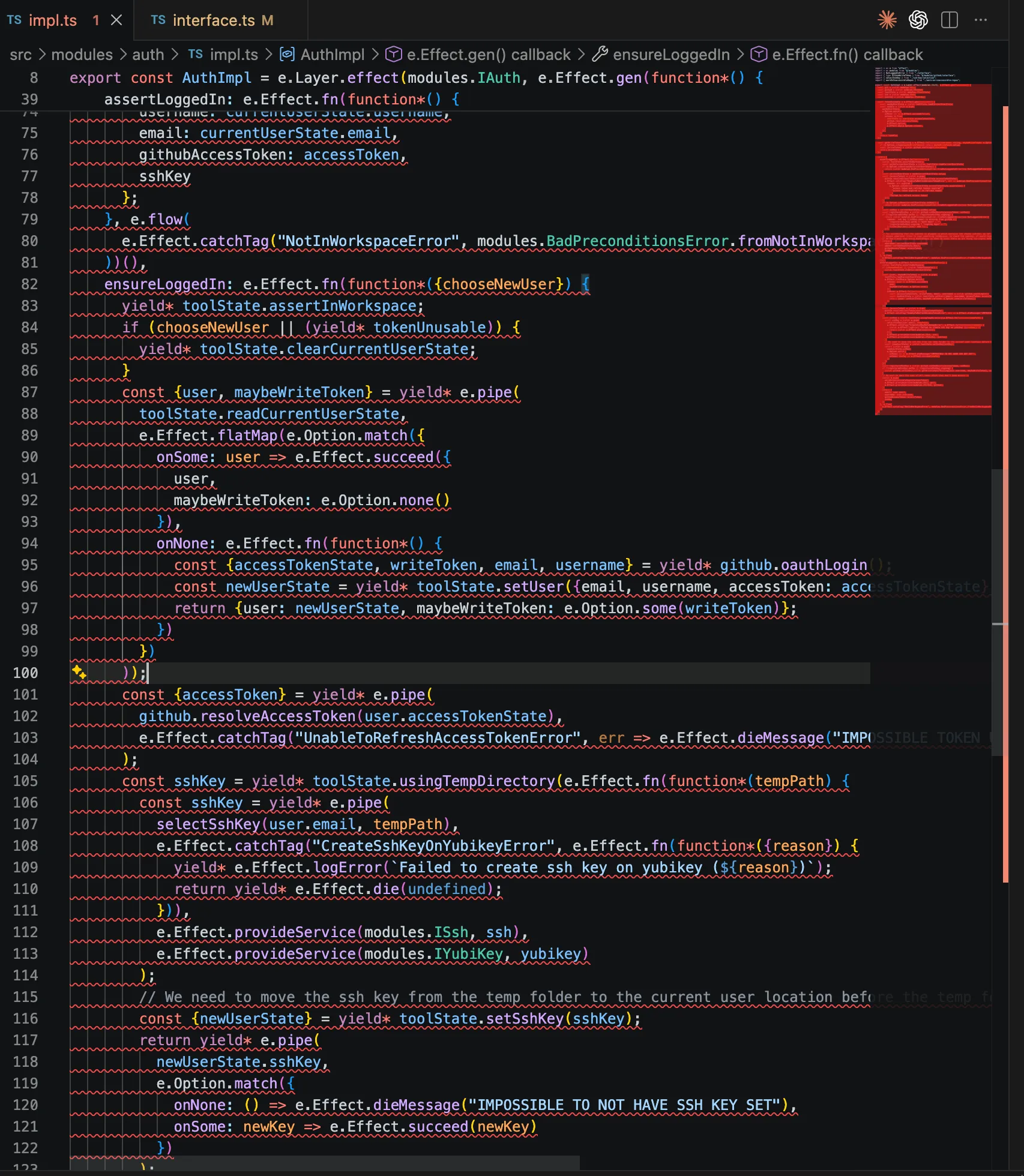
Seeing the whole Layer implementation light up as incorrect is not conducive to productively finding and fixing the bug. Ideally only the resolveAccessToken line would be highlighted as wrong, prompting me to provide a Context with the required Service to that Effect.
When one runs into this kind of issue frequently, it becomes tempting to start taking the path of least resistance. That often looks like handling all possible errors after the entire Effect’s body rather than handling each error at the line which produces it; over time these kinds of shortcuts lead to brittle and confusing code.
4. Verbose Dependency Passing
Building on that resolveAccessToken example, when you want to yield an Effect which depends on 1+ services you need to either define that Effect within the Layer’s closure so the services yielded at layer construction time are in scope, or you need to create a custom Context and provide it to the Effect before yielding.
Here’s an example of that first option
class class ServiceOneServiceOne extends import ContextContext.const Tag: <"ServiceOne">(id: "ServiceOne") => <Self, Shape>() => Context.TagClass<Self, "ServiceOne", Shape>Tag("ServiceOne")<class ServiceOneServiceOne, {
function serviceOneMethod(someInput: number): Effect.Effect<string, never, never>serviceOneMethod(someInput: numbersomeInput: number): import EffectEffect.interface Effect<out A, out E = never, out R = never>The Effect interface defines a value that describes a workflow or job,
which can succeed or fail.
Details
The Effect interface represents a computation that can model a workflow
involving various types of operations, such as synchronous, asynchronous,
concurrent, and parallel interactions. It operates within a context of type
R, and the result can either be a success with a value of type A or a
failure with an error of type E. The Effect is designed to handle complex
interactions with external resources, offering advanced features such as
fiber-based concurrency, scheduling, interruption handling, and scalability.
This makes it suitable for tasks that require fine-grained control over
concurrency and error management.
To execute an Effect value, you need a Runtime, which provides the
environment necessary to run and manage the computation.
Effect<string, never, never>;
}>() {};
class class ServiceTwoServiceTwo extends import ContextContext.const Tag: <"ServiceTwo">(id: "ServiceTwo") => <Self, Shape>() => Context.TagClass<Self, "ServiceTwo", Shape>Tag("ServiceTwo")<class ServiceTwoServiceTwo, {
function serviceTwoMethod(someInput: number): Effect.Effect<string, never, never>serviceTwoMethod(someInput: numbersomeInput: number): import EffectEffect.interface Effect<out A, out E = never, out R = never>The Effect interface defines a value that describes a workflow or job,
which can succeed or fail.
Details
The Effect interface represents a computation that can model a workflow
involving various types of operations, such as synchronous, asynchronous,
concurrent, and parallel interactions. It operates within a context of type
R, and the result can either be a success with a value of type A or a
failure with an error of type E. The Effect is designed to handle complex
interactions with external resources, offering advanced features such as
fiber-based concurrency, scheduling, interruption handling, and scalability.
This makes it suitable for tasks that require fine-grained control over
concurrency and error management.
To execute an Effect value, you need a Runtime, which provides the
environment necessary to run and manage the computation.
Effect<string, never, never>;
}>() {};
const const ServiceTwoImpl: Layer.Layer<ServiceTwo, never, ServiceOne>ServiceTwoImpl = import LayerLayer.const effect: <ServiceTwo, {
serviceTwoMethod(someInput: number): Effect.Effect<string, never, never>;
}, never, ServiceOne>(tag: Context.Tag<ServiceTwo, {
serviceTwoMethod(someInput: number): Effect.Effect<string, never, never>;
}>, effect: Effect.Effect<{
serviceTwoMethod(someInput: number): Effect.Effect<string, never, never>;
}, never, ServiceOne>) => Layer.Layer<ServiceTwo, never, ServiceOne> (+1 overload)
Constructs a layer from the specified effect.
effect(class ServiceTwoServiceTwo, import EffectEffect.const gen: <YieldWrap<Context.Tag<ServiceOne, {
serviceOneMethod(someInput: number): Effect.Effect<string, never, never>;
}>>, {
serviceTwoMethod: (someInput: number) => Effect.Effect<string, never, never>;
}>(f: (resume: Effect.Adapter) => Generator<YieldWrap<Context.Tag<ServiceOne, {
serviceOneMethod(someInput: number): Effect.Effect<string, never, never>;
}>>, {
serviceTwoMethod: (someInput: number) => Effect.Effect<string, never, never>;
}, never>) => Effect.Effect<...> (+1 overload)
Provides a way to write effectful code using generator functions, simplifying
control flow and error handling.
When to Use
Effect.gen allows you to write code that looks and behaves like synchronous
code, but it can handle asynchronous tasks, errors, and complex control flow
(like loops and conditions). It helps make asynchronous code more readable
and easier to manage.
The generator functions work similarly to async/await but with more
explicit control over the execution of effects. You can yield* values from
effects and return the final result at the end.
Example
import { Effect } from "effect"
const addServiceCharge = (amount: number) => amount + 1
const applyDiscount = (
total: number,
discountRate: number
): Effect.Effect<number, Error> =>
discountRate === 0
? Effect.fail(new Error("Discount rate cannot be zero"))
: Effect.succeed(total - (total * discountRate) / 100)
const fetchTransactionAmount = Effect.promise(() => Promise.resolve(100))
const fetchDiscountRate = Effect.promise(() => Promise.resolve(5))
export const program = Effect.gen(function* () {
const transactionAmount = yield* fetchTransactionAmount
const discountRate = yield* fetchDiscountRate
const discountedAmount = yield* applyDiscount(
transactionAmount,
discountRate
)
const finalAmount = addServiceCharge(discountedAmount)
return `Final amount to charge: ${finalAmount}`
})
gen(function*() {
const const serviceOne: {
serviceOneMethod(someInput: number): Effect.Effect<string, never, never>;
}
class ServiceOneServiceOne;
const const helperFn: (someInput: number) => Effect.Effect<string, never, never>helperFn = import EffectEffect.const fn: <YieldWrap<Effect.Effect<string, never, never>>, string, [someInput: number]>(body: (someInput: number) => Generator<YieldWrap<Effect.Effect<string, never, never>>, string, never>) => (someInput: number) => Effect.Effect<string, never, never> (+20 overloads)fn(function*(someInput: numbersomeInput: number) {
// By placing helperFn inside the layer, it can access serviceOne directly
const const serviceOneResult: stringserviceOneResult = yield* const serviceOne: {
serviceOneMethod(someInput: number): Effect.Effect<string, never, never>;
}
function serviceOneMethod(someInput: number): Effect.Effect<string, never, never>serviceOneMethod(someInput: numbersomeInput);
// Do something complex with result before returning it.
const const complexResult: stringcomplexResult = const serviceOneResult: stringserviceOneResult;
return const complexResult: stringcomplexResult;
});
return {
serviceTwoMethod: (someInput: number) => Effect.Effect<string, never, never>serviceTwoMethod: import EffectEffect.const fn: <YieldWrap<Effect.Effect<string, never, never>>, string, [someInput: number]>(body: (someInput: number) => Generator<YieldWrap<Effect.Effect<string, never, never>>, string, never>) => (someInput: number) => Effect.Effect<string, never, never> (+20 overloads)fn(function*(someInput: numbersomeInput) {
return yield* const helperFn: (someInput: number) => Effect.Effect<string, never, never>helperFn(someInput: numbersomeInput);
})
}
}));And here’s option two
const const helperFn: (someInput: number) => Effect.Effect<string, never, ServiceOne>helperFn = import EffectEffect.const fn: <YieldWrap<Context.Tag<ServiceOne, {
serviceOneMethod(someInput: number): Effect.Effect<string, never, never>;
}>> | YieldWrap<Effect.Effect<string, never, never>>, string, [someInput: number]>(body: (someInput: number) => Generator<YieldWrap<Context.Tag<ServiceOne, {
serviceOneMethod(someInput: number): Effect.Effect<string, never, never>;
}>> | YieldWrap<Effect.Effect<string, never, never>>, string, never>) => (someInput: number) => Effect.Effect<...> (+20 overloads)
someInput: numbersomeInput: number) {
const const serviceOne: {
serviceOneMethod(someInput: number): Effect.Effect<string, never, never>;
}
class ServiceOneServiceOne;
const const serviceOneResult: stringserviceOneResult = yield* const serviceOne: {
serviceOneMethod(someInput: number): Effect.Effect<string, never, never>;
}
function serviceOneMethod(someInput: number): Effect.Effect<string, never, never>serviceOneMethod(someInput: numbersomeInput);
// Do something complex with result before returning it.
const const complexResult: stringcomplexResult = const serviceOneResult: stringserviceOneResult;
return const complexResult: stringcomplexResult;
});
const const ServiceTwoImpl: Layer.Layer<ServiceTwo, never, ServiceOne>ServiceTwoImpl = import LayerLayer.const effect: <ServiceTwo, {
serviceTwoMethod(someInput: number): Effect.Effect<string, never, never>;
}, never, ServiceOne>(tag: Context.Tag<ServiceTwo, {
serviceTwoMethod(someInput: number): Effect.Effect<string, never, never>;
}>, effect: Effect.Effect<{
serviceTwoMethod(someInput: number): Effect.Effect<string, never, never>;
}, never, ServiceOne>) => Layer.Layer<ServiceTwo, never, ServiceOne> (+1 overload)
Constructs a layer from the specified effect.
effect(class ServiceTwoServiceTwo, import EffectEffect.const gen: <YieldWrap<Context.Tag<ServiceOne, {
serviceOneMethod(someInput: number): Effect.Effect<string, never, never>;
}>>, {
serviceTwoMethod: (someInput: number) => Effect.Effect<string, never, never>;
}>(f: (resume: Effect.Adapter) => Generator<YieldWrap<Context.Tag<ServiceOne, {
serviceOneMethod(someInput: number): Effect.Effect<string, never, never>;
}>>, {
serviceTwoMethod: (someInput: number) => Effect.Effect<string, never, never>;
}, never>) => Effect.Effect<...> (+1 overload)
Provides a way to write effectful code using generator functions, simplifying
control flow and error handling.
When to Use
Effect.gen allows you to write code that looks and behaves like synchronous
code, but it can handle asynchronous tasks, errors, and complex control flow
(like loops and conditions). It helps make asynchronous code more readable
and easier to manage.
The generator functions work similarly to async/await but with more
explicit control over the execution of effects. You can yield* values from
effects and return the final result at the end.
Example
import { Effect } from "effect"
const addServiceCharge = (amount: number) => amount + 1
const applyDiscount = (
total: number,
discountRate: number
): Effect.Effect<number, Error> =>
discountRate === 0
? Effect.fail(new Error("Discount rate cannot be zero"))
: Effect.succeed(total - (total * discountRate) / 100)
const fetchTransactionAmount = Effect.promise(() => Promise.resolve(100))
const fetchDiscountRate = Effect.promise(() => Promise.resolve(5))
export const program = Effect.gen(function* () {
const transactionAmount = yield* fetchTransactionAmount
const discountRate = yield* fetchDiscountRate
const discountedAmount = yield* applyDiscount(
transactionAmount,
discountRate
)
const finalAmount = addServiceCharge(discountedAmount)
return `Final amount to charge: ${finalAmount}`
})
gen(function*() {
const const serviceOne: {
serviceOneMethod(someInput: number): Effect.Effect<string, never, never>;
}
class ServiceOneServiceOne;
// We have to manually create this Context then provide it to the helper function
const const context: Context.Context<ServiceOne>context = pipe<Context.Context<never>, Context.Context<ServiceOne>>(a: Context.Context<never>, ab: (a: Context.Context<never>) => Context.Context<ServiceOne>): Context.Context<ServiceOne> (+19 overloads)Pipes the value of an expression into a pipeline of functions.
Details
The pipe function is a utility that allows us to compose functions in a
readable and sequential manner. It takes the output of one function and
passes it as the input to the next function in the pipeline. This enables us
to build complex transformations by chaining multiple functions together.
import { pipe } from "effect"
const result = pipe(input, func1, func2, ..., funcN)
In this syntax, input is the initial value, and func1, func2, ...,
funcN are the functions to be applied in sequence. The result of each
function becomes the input for the next function, and the final result is
returned.
Here's an illustration of how pipe works:
┌───────┐ ┌───────┐ ┌───────┐ ┌───────┐ ┌───────┐ ┌────────┐
│ input │───►│ func1 │───►│ func2 │───►│ ... │───►│ funcN │───►│ result │
└───────┘ └───────┘ └───────┘ └───────┘ └───────┘ └────────┘
It's important to note that functions passed to pipe must have a single
argument because they are only called with a single argument.
When to Use
This is useful in combination with data-last functions as a simulation of
methods:
as.map(f).filter(g)
becomes:
import { pipe, Array } from "effect"
pipe(as, Array.map(f), Array.filter(g))
Example (Chaining Arithmetic Operations)
import { pipe } from "effect"
// Define simple arithmetic operations
const increment = (x: number) => x + 1
const double = (x: number) => x * 2
const subtractTen = (x: number) => x - 10
// Sequentially apply these operations using `pipe`
const result = pipe(5, increment, double, subtractTen)
console.log(result)
// Output: 2
pipe(
import ContextContext.const empty: () => Context.Context<never>Returns an empty Context.
empty(),
import ContextContext.const add: <ServiceOne, {
serviceOneMethod(someInput: number): Effect.Effect<string, never, never>;
}>(tag: Context.Tag<ServiceOne, {
serviceOneMethod(someInput: number): Effect.Effect<string, never, never>;
}>, service: {
serviceOneMethod(someInput: number): Effect.Effect<string, never, never>;
}) => <Services>(self: Context.Context<Services>) => Context.Context<ServiceOne | Services> (+1 overload)
Adds a service to a given Context.
add(class ServiceOneServiceOne, const serviceOne: {
serviceOneMethod(someInput: number): Effect.Effect<string, never, never>;
}
serviceTwoMethod: (someInput: number) => Effect.Effect<string, never, never>serviceTwoMethod: import EffectEffect.const fn: <YieldWrap<Effect.Effect<string, never, never>>, string, [someInput: number]>(body: (someInput: number) => Generator<YieldWrap<Effect.Effect<string, never, never>>, string, never>) => (someInput: number) => Effect.Effect<string, never, never> (+20 overloads)fn(function*(someInput: numbersomeInput) {
// Because helperFn lives outside the impl, we have to pass a context or
// eject from DI entirely and pass all services as function params
return yield* const helperFn: (someInput: number) => Effect.Effect<string, never, ServiceOne>helperFn(someInput: numbersomeInput).Pipeable.pipe<Effect.Effect<string, never, ServiceOne>, Effect.Effect<string, never, never>>(this: Effect.Effect<string, never, ServiceOne>, ab: (_: Effect.Effect<string, never, ServiceOne>) => Effect.Effect<string, never, never>): Effect.Effect<string, never, never> (+21 overloads)pipe(import EffectEffect.const provide: <ServiceOne>(context: Context.Context<ServiceOne>) => <A, E, R>(self: Effect.Effect<A, E, R>) => Effect.Effect<A, E, Exclude<R, ServiceOne>> (+9 overloads)Provides necessary dependencies to an effect, removing its environmental
requirements.
Details
This function allows you to supply the required environment for an effect.
The environment can be provided in the form of one or more Layers, a
Context, a Runtime, or a ManagedRuntime. Once the environment is
provided, the effect can run without requiring external dependencies.
You can compose layers to create a modular and reusable way of setting up the
environment for effects. For example, layers can be used to configure
databases, logging services, or any other required dependencies.
Example
import { Context, Effect, Layer } from "effect"
class Database extends Context.Tag("Database")<
Database,
{ readonly query: (sql: string) => Effect.Effect<Array<unknown>> }
>() {}
const DatabaseLive = Layer.succeed(
Database,
{
// Simulate a database query
query: (sql: string) => Effect.log(`Executing query: ${sql}`).pipe(Effect.as([]))
}
)
// ┌─── Effect<unknown[], never, Database>
// ▼
const program = Effect.gen(function*() {
const database = yield* Database
const result = yield* database.query("SELECT * FROM users")
return result
})
// ┌─── Effect<unknown[], never, never>
// ▼
const runnable = Effect.provide(program, DatabaseLive)
Effect.runPromise(runnable).then(console.log)
// Output:
// timestamp=... level=INFO fiber=#0 message="Executing query: SELECT * FROM users"
// []
provide(const context: Context.Context<ServiceOne>context));
})
}
}));As we get into 5+ services territory the code for specifying dependencies and adding them all to a reusable context starts to smell like unnecessary boilerplate.
const serviceOne = yield* ServiceOne;
const serviceTwo = yield* ServiceTwo;
const serviceThree = yield* ServiceThree;
const serviceFour = yield* ServiceFour;
const serviceFive = yield* ServiceFive;
const context = e.pipe(
  e.Context.empty(),
  e.Context.add(ServiceOne, serviceOne),
  e.Context.add(ServiceTwo, serviceTwo),
  e.Context.add(ServiceThree, serviceThree),
  e.Context.add(ServiceFour, serviceFour),
  e.Context.add(ServiceFive, serviceFive)
)
This is what we’re calling state-of-the-art TypeScript in 2026?
5. Confusing Naming Conventions
Lastly, I’ve always been bothered by Effect’s use of the term “service”. To me, “service” alludes to some outside entity which my code can invoke via some network call, but in Effect a service is basically a singleton instance which encapsulates some common internal logic. “Tag” is also confusing compared to a well-known term like “interface”. I’m aware that Effect is following conventions established by other DI frameworks like ZIO or Angular, but from my POV defaults should be sensible and names shouldn’t be surprising.
Effective Modules
All these headaches had me searching for ways to make Effect feel more self-explanatory and intuitive. Effect seems to be creating the right set of foundational primitives for building production-grade TypeScript, so it seems worthwhile to invest in making these primitives feel good to work with.
Enough experimentation eventually led to something packageable as its own library. I’m calling it Effective Modules. Perhaps some of these ideas / patterns might make their way into Effect core and / or the canonical docs / examples at some point? Let me know what you think.
Effective?
I’m coining the word “Effective” here to mean idiomatic, elegant Effect code. “Effective” is to Effect as “Pythonic” is to Python. Not to be confused with “Effectful”.
Modules?
Modules is my word of choice over “tag” or “service”. Module typically refers to some group of encapsulated code which is internal to a project. Module also implies a grouping of related functionality, and when Uncle Bob first described the Dependency Inversion Principle he used “class” and “module” interchangeably when referring to code building blocks that depend on each other. The wiki article on DIP does this too.
I confess to substituting one overloaded term for another with “modules”
- folders or files can be called modules (e.g. ES Modules or Rust modules)
- libraries can be modules (e.g. Go Modules)
- modules can simply mean a group of code (e.g. NestJS modules)
Despite the phrase’s frequent use, the commonality here is that “module” in all these cases refers to code that’s internal, encapsulated, and logically grouped under a namespace. To me, that’s a more sensible fit than “service”. I’d love to see a rebuttal.
Module Declaration
With Effective Modules, we return to the plain interface.
Before
class class UsersUsers extends import ContextContext.const Tag: <"Users">(id: "Users") => <Self, Shape>() => Context.TagClass<Self, "Users", Shape>Tag("Users")<
class UsersUsers,
{
function createUser(username: string, signature: string): Effect.Effect<{
token: string;
}, BadSignature>
username: stringusername: string,
signature: stringsignature: string
): import EffectEffect.interface Effect<out A, out E = never, out R = never>The Effect interface defines a value that describes a workflow or job,
which can succeed or fail.
Details
The Effect interface represents a computation that can model a workflow
involving various types of operations, such as synchronous, asynchronous,
concurrent, and parallel interactions. It operates within a context of type
R, and the result can either be a success with a value of type A or a
failure with an error of type E. The Effect is designed to handle complex
interactions with external resources, offering advanced features such as
fiber-based concurrency, scheduling, interruption handling, and scalability.
This makes it suitable for tasks that require fine-grained control over
concurrency and error management.
To execute an Effect value, you need a Runtime, which provides the
environment necessary to run and manage the computation.
Effect<{token: stringtoken: string}, class BadSignatureBadSignature>;
function authenticate(username: string, signature: string): Effect.Effect<{
token: string;
}, BadSignature>
username: stringusername: string,
signature: stringsignature: string
): import EffectEffect.interface Effect<out A, out E = never, out R = never>The Effect interface defines a value that describes a workflow or job,
which can succeed or fail.
Details
The Effect interface represents a computation that can model a workflow
involving various types of operations, such as synchronous, asynchronous,
concurrent, and parallel interactions. It operates within a context of type
R, and the result can either be a success with a value of type A or a
failure with an error of type E. The Effect is designed to handle complex
interactions with external resources, offering advanced features such as
fiber-based concurrency, scheduling, interruption handling, and scalability.
This makes it suitable for tasks that require fine-grained control over
concurrency and error management.
To execute an Effect value, you need a Runtime, which provides the
environment necessary to run and manage the computation.
Effect<{token: stringtoken: string}, class BadSignatureBadSignature>;
}
>() {}After
interface IUsers {
IUsers.createUser(username: string, signature: string): Effect.fn.Return<{
token: string;
}, BadSignature>
username: stringusername: string,
signature: stringsignature: string
): import EffectEffect.fn.type fn.Return<A, E = never, R = never> = Generator<YieldWrap<Effect.Effect<any, E, R>>, A, any>Return<{token: stringtoken: string}, class BadSignatureBadSignature>;
IUsers.authenticate(username: string, signature: string): Effect.fn.Return<{
token: string;
}, BadSignature>
username: stringusername: string,
signature: stringsignature: string
): import EffectEffect.fn.type fn.Return<A, E = never, R = never> = Generator<YieldWrap<Effect.Effect<any, E, R>>, A, any>Return<{token: stringtoken: string}, class BadSignatureBadSignature>;
}Tags (Services in v4) are created by mapping each module name to an interface.
import { function interfaces<ModuleKeysEnum extends string, Interfaces extends { [moduleKey in ModuleKeysEnum]: any; }>(moduleKeysEnum: StringEnum<ModuleKeysEnum>): { [moduleKey in ModuleKeysEnum]: Tag<moduleKey, Interfaces[moduleKey]>; }interfaces } from "effective-modules";
export enum enum ModulesModules {
function (enum member) Modules.Users = "Users"Users = "Users",
function (enum member) Modules.Todos = "Todos"Todos = "Todos",
function (enum member) Modules.Database = "Database"Database = "Database"
}
export const const modules: {
Users: Tag<Modules.Users, IUsers>;
Todos: Tag<Modules.Todos, ITodos>;
Database: Tag<Modules.Database, IDatabase>;
}
interfaces<Modules, {
Users: IUsers;
Todos: ITodos;
Database: IDatabase;
}>(moduleKeysEnum: StringEnum<Modules>): {
Users: Tag<Modules.Users, IUsers>;
Todos: Tag<Modules.Todos, ITodos>;
Database: Tag<Modules.Database, IDatabase>;
}
enum ModulesModules, {
type Users: IUsersUsers: IUsers;
type Todos: ITodosTodos: ITodos;
type Database: IDatabaseDatabase: IDatabase;
}>(enum ModulesModules);
const modules: {
Users: Tag<Modules.Users, IUsers>;
Todos: Tag<Modules.Todos, ITodos>;
Database: Tag<Modules.Database, IDatabase>;
}
The string enum members are used as the Tags’ Self and key types, bypassing the need for the cluttered class syntax mentioned earlier since string enum members are similarly both a runtime value and a type. This method of creating Tags is also a more correct means of ensuring uniqueness since string enum members are nominal types, meaning TypeScript will treat two Effective Modules with the same name as distinct. No fancy private property tricks necessary.
enum enum ModuleSetOneModuleSetOne {
function (enum member) ModuleSetOne.Users = "Users"Users = "Users",
function (enum member) ModuleSetOne.Database = "Database"Database = "Database"
}
const const moduleSetOne: {
Users: Tag<ModuleSetOne.Users, {}>;
Database: Tag<ModuleSetOne.Database, {}>;
}
interfaces<ModuleSetOne, {
Users: {};
Database: {};
}>(moduleKeysEnum: StringEnum<ModuleSetOne>): {
Users: Tag<ModuleSetOne.Users, {}>;
Database: Tag<ModuleSetOne.Database, {}>;
}
enum ModuleSetOneModuleSetOne, {
type Users: {}Users: {};
type Database: {}Database: {};
}>(enum ModuleSetOneModuleSetOne);
enum enum ModuleSetTwoModuleSetTwo {
function (enum member) ModuleSetTwo.Users = "Users"Users = "Users",
function (enum member) ModuleSetTwo.Database = "Database"Database = "Database"
}
const const moduleSetTwo: {
Users: Tag<ModuleSetTwo.Users, {}>;
Database: Tag<ModuleSetTwo.Database, {}>;
}
interfaces<ModuleSetTwo, {
Users: {};
Database: {};
}>(moduleKeysEnum: StringEnum<ModuleSetTwo>): {
Users: Tag<ModuleSetTwo.Users, {}>;
Database: Tag<ModuleSetTwo.Database, {}>;
}
enum ModuleSetTwoModuleSetTwo, {
type Users: {}Users: {};
type Database: {}Database: {};
}>(enum ModuleSetTwoModuleSetTwo);
function* function program(): Effect.fn.Return<void, never, ModuleSetTwo.Users>program(): import EffectEffect.fn.type fn.Return<A, E = never, R = never> = Generator<YieldWrap<Effect.Effect<any, E, R>>, A, any>Return<void, never, enum ModuleSetTwoModuleSetTwo.function (enum member) ModuleSetTwo.Users = "Users"Users> {
yield* const moduleSetTwo: {
Users: Tag<ModuleSetTwo.Users, {}>;
Database: Tag<ModuleSetTwo.Database, {}>;
}
type Users: Tag<ModuleSetTwo.Users, {}>Users;
// A compiler error, as there should be.
yield* moduleSetOne.Users;}We’ll dive into this a bit more later, but notice how we’ve managed to get an error at a specific line rather than the entire generator function being marked as incorrect. This is achieved by explicitly typing the return of the generator function using Effect.fn.Return rather than using the prescribed Effect.gen or Effect.fn + anon generator function.
Module Implementation
In Effective Modules, you create a class which implements an interface.
Before
export const const TodosLive: Layer.Layer<Modules.Todos, never, Modules.Users | Modules.Database>TodosLive = import LayerLayer.const effect: <Modules.Todos, ITodos, never, Modules.Users | Modules.Database>(tag: Tag<Modules.Todos, ITodos>, effect: Effect.Effect<ITodos, never, Modules.Users | Modules.Database>) => Layer.Layer<Modules.Todos, never, Modules.Users | Modules.Database> (+1 overload)Constructs a layer from the specified effect.
effect(
const Todos: Tag<Modules.Todos, ITodos>Todos,
import EffectEffect.const gen: <YieldWrap<Tag<Modules.Database, IDatabase>> | YieldWrap<Tag<Modules.Users, IUsers>>, {
getTasks: (token: string) => Effect.Effect<{
id: string;
task: string;
}[], InvalidToken, never>;
createTask: (token: string, task: string) => Effect.Effect<{
id: string;
task: string;
}, InvalidToken, never>;
completeTask: (token: string, id: string) => Effect.Effect<undefined, InvalidToken | NoSuchTask, never>;
}>(f: (resume: Effect.Adapter) => Generator<...>) => Effect.Effect<...> (+1 overload)
Provides a way to write effectful code using generator functions, simplifying
control flow and error handling.
When to Use
Effect.gen allows you to write code that looks and behaves like synchronous
code, but it can handle asynchronous tasks, errors, and complex control flow
(like loops and conditions). It helps make asynchronous code more readable
and easier to manage.
The generator functions work similarly to async/await but with more
explicit control over the execution of effects. You can yield* values from
effects and return the final result at the end.
Example
import { Effect } from "effect"
const addServiceCharge = (amount: number) => amount + 1
const applyDiscount = (
total: number,
discountRate: number
): Effect.Effect<number, Error> =>
discountRate === 0
? Effect.fail(new Error("Discount rate cannot be zero"))
: Effect.succeed(total - (total * discountRate) / 100)
const fetchTransactionAmount = Effect.promise(() => Promise.resolve(100))
const fetchDiscountRate = Effect.promise(() => Promise.resolve(5))
export const program = Effect.gen(function* () {
const transactionAmount = yield* fetchTransactionAmount
const discountRate = yield* fetchDiscountRate
const discountedAmount = yield* applyDiscount(
transactionAmount,
discountRate
)
const finalAmount = addServiceCharge(discountedAmount)
return `Final amount to charge: ${finalAmount}`
})
gen(function*() {
const const users: IUsersusers = yield* const Users: Tag<Modules.Users, IUsers>Users;
const const db: IDatabasedb = yield* const Database: Tag<Modules.Database, IDatabase>Database;
const const TASKS_TABLE: "tasks"TASKS_TABLE = "tasks";
const const validateTokenOrError: (token: string) => Effect.Effect<string, InvalidToken, never>validateTokenOrError = import EffectEffect.const fn: <YieldWrap<Effect.Effect<never, InvalidToken, never>> | YieldWrap<Effect.Effect<any, never, never>>, string, [token: string]>(body: (token: string) => Generator<YieldWrap<Effect.Effect<never, InvalidToken, never>> | YieldWrap<Effect.Effect<any, never, never>>, string, never>) => (token: string) => Effect.Effect<string, InvalidToken, never> (+20 overloads)fn(function*(token: stringtoken: string) {
const const maybeUsername: Option.Option<{
username: string;
}>
const users: IUsersusers.IUsers.validateToken(token: string): Effect.fn.Return<Option.Option<{
username: string;
}>>
token: stringtoken);
if (import OptionOption.const isNone: <{
username: string;
}>(self: Option.Option<{
username: string;
}>) => self is Option.None<{
username: string;
}>
Checks whether an Option represents the absence of a value (None).
isNone(const maybeUsername: Option.Option<{
username: string;
}>
constructor InvalidToken<{}>(args: void): InvalidTokenInvalidToken();
}
return const maybeUsername: Option.Some<{
username: string;
}>
Some<{ username: string; }>.value: {
username: string;
}
username: stringusername;
});
return {
getTasks: (token: string) => Effect.Effect<{
id: string;
task: string;
}[], InvalidToken, never>
import EffectEffect.const fn: <YieldWrap<Effect.Effect<string, InvalidToken, never>> | YieldWrap<Effect.Effect<{
key: string;
value: string;
}[], never, never>>, {
id: string;
task: string;
}[], [token: string]>(body: (token: string) => Generator<YieldWrap<Effect.Effect<string, InvalidToken, never>> | YieldWrap<Effect.Effect<{
key: string;
value: string;
}[], never, never>>, {
id: string;
task: string;
}[], never>) => (token: string) => Effect.Effect<{
id: string;
task: string;
}[], InvalidToken, never> (+20 overloads)
token: stringtoken) {
const const username: stringusername = yield* const validateTokenOrError: (token: string) => Effect.Effect<string, InvalidToken, never>validateTokenOrError(token: stringtoken);
const const items: {
key: string;
value: string;
}[]
const db: IDatabasedb.IDatabase.getAll(table: string, username: string): Effect.Effect<{
key: string;
value: string;
}[]>
const TASKS_TABLE: "tasks"TASKS_TABLE, const username: stringusername);
return const items: {
key: string;
value: string;
}[]
Array<{ key: string; value: string; }>.map<{
id: string;
task: string;
}>(callbackfn: (value: {
key: string;
value: string;
}, index: number, array: {
key: string;
value: string;
}[]) => {
id: string;
task: string;
}, thisArg?: any): {
id: string;
task: string;
}[]
Calls a defined callback function on each element of an array, and returns an array that contains the results.
map(({key: stringkey, value: stringvalue}) => ({id: stringid: key: stringkey, task: stringtask: value: stringvalue}));
}),
createTask: (token: string, task: string) => Effect.Effect<{
id: string;
task: string;
}, InvalidToken, never>
import EffectEffect.const fn: <YieldWrap<Effect.Effect<any, never, never>> | YieldWrap<Effect.Effect<string, InvalidToken, never>>, {
id: string;
task: string;
}, [token: string, task: string]>(body: (token: string, task: string) => Generator<YieldWrap<Effect.Effect<any, never, never>> | YieldWrap<Effect.Effect<string, InvalidToken, never>>, {
id: string;
task: string;
}, never>) => (token: string, task: string) => Effect.Effect<{
id: string;
task: string;
}, InvalidToken, never> (+20 overloads)
token: stringtoken, task: stringtask) {
const const username: stringusername = yield* const validateTokenOrError: (token: string) => Effect.Effect<string, InvalidToken, never>validateTokenOrError(token: stringtoken);
const { const key: stringkey } = yield* const db: IDatabasedb.IDatabase.set(table: string, username: string, value: string, key?: string): Effect.fn.Return<{
key: string;
}>
const TASKS_TABLE: "tasks"TASKS_TABLE, const username: stringusername, task: stringtask);
return {id: stringid: const key: stringkey, task: stringtask};
}),
completeTask: (token: string, id: string) => Effect.Effect<undefined, InvalidToken | NoSuchTask, never>completeTask: import EffectEffect.const fn: <YieldWrap<Effect.Effect<any, never, never>> | YieldWrap<Effect.Effect<string, InvalidToken, never>> | YieldWrap<Effect.Effect<never, NoSuchTask, never>>, undefined, [token: string, id: string]>(body: (token: string, id: string) => Generator<YieldWrap<Effect.Effect<any, never, never>> | YieldWrap<Effect.Effect<string, InvalidToken, never>> | YieldWrap<Effect.Effect<never, NoSuchTask, never>>, undefined, never>) => (token: string, id: string) => Effect.Effect<...> (+20 overloads)fn(function* (token: stringtoken, id: stringid) {
const const username: stringusername = yield* const validateTokenOrError: (token: string) => Effect.Effect<string, InvalidToken, never>validateTokenOrError(token: stringtoken);
const const exists: booleanexists = import OptionOption.const isSome: <string>(self: Option.Option<string>) => self is Option.Some<string>Checks whether an Option contains a value (Some).
isSome(yield* const db: IDatabasedb.IDatabase.get(table: string, username: string, key: string): Effect.fn.Return<Option.Option<string>>get(const TASKS_TABLE: "tasks"TASKS_TABLE, const username: stringusername, id: stringid));
if (!const exists: booleanexists) return yield* new constructor NoSuchTask<{}>(args: void): NoSuchTaskNoSuchTask();
yield* const db: IDatabasedb.IDatabase.delete(table: string, username: string, key: string): Effect.fn.Return<void>delete(const TASKS_TABLE: "tasks"TASKS_TABLE, const username: stringusername, id: stringid);
})
};
})
)
const TodosLive: Layer.Layer<Modules.Todos, never, Modules.Users | Modules.Database>TodosLive
After
import { const implementing: <Module extends Tag<any, any>>(module: Module) => ModuleSuperClass<Module, None, None>implementing } from "effective-modules";
export class class TodosImplTodosImpl extends implementing<Tag<Modules.Todos, ITodos>>(module: Tag<Modules.Todos, ITodos>): ModuleSuperClass<Tag<Modules.Todos, ITodos>, None, None>implementing(const Todos: Tag<Modules.Todos, ITodos>Todos).uses: <Tag<Modules.Database, IDatabase>, [Tag<Modules.Users, IUsers>]>(first: Tag<Modules.Database, IDatabase>, others_0: Tag<Modules.Users, IUsers>) => ModuleSuperClass<Tag<Modules.Todos, ITodos>, Some<[Tag<Modules.Database, IDatabase>, Tag<Modules.Users, IUsers>]>, None>uses(const Database: Tag<Modules.Database, IDatabase>Database, const Users: Tag<Modules.Users, IUsers>Users) implements ITodos {
private static readonly TodosImpl.TASKS_TABLE: "tasks"TASKS_TABLE = "tasks";
*TodosImpl.getTasks(token: string): Effect.fn.Return<{
task: string;
id: string;
}[], InvalidToken>
token: stringtoken: string): import EffectEffect.fn.type fn.Return<A, E = never, R = never> = Generator<YieldWrap<Effect.Effect<any, E, R>>, A, any>Return<{ task: stringtask: string; id: stringid: string; }[], class InvalidTokenInvalidToken> {
const const username: stringusername = yield* this.TodosImpl.validateTokenOrError(token: string): Effect.fn.Return<string, InvalidToken>validateTokenOrError(token: stringtoken);
const const items: {
key: string;
value: string;
}[]
dependencies: {
readonly Database: IDatabase;
readonly Users: IUsers;
}
type Database: IDatabaseDatabase.IDatabase.getAll(table: string, username: string): Effect.fn.Return<{
key: string;
value: string;
}[]>
class TodosImplTodosImpl.TodosImpl.TASKS_TABLE: "tasks"TASKS_TABLE, const username: stringusername
);
return const items: {
key: string;
value: string;
}[]
Array<{ key: string; value: string; }>.map<{
id: string;
task: string;
}>(callbackfn: (value: {
key: string;
value: string;
}, index: number, array: {
key: string;
value: string;
}[]) => {
id: string;
task: string;
}, thisArg?: any): {
id: string;
task: string;
}[]
Calls a defined callback function on each element of an array, and returns an array that contains the results.
map(({key: stringkey, value: stringvalue}) => ({id: stringid: key: stringkey, task: stringtask: value: stringvalue}));
}
*TodosImpl.createTask(token: string, task: string): Effect.fn.Return<{
task: string;
id: string;
}, InvalidToken>
token: stringtoken: string, task: stringtask: string): import EffectEffect.fn.type fn.Return<A, E = never, R = never> = Generator<YieldWrap<Effect.Effect<any, E, R>>, A, any>Return<{ task: stringtask: string; id: stringid: string; }, class InvalidTokenInvalidToken> {
const const username: stringusername = yield* this.TodosImpl.validateTokenOrError(token: string): Effect.fn.Return<string, InvalidToken>validateTokenOrError(token: stringtoken);
const { const key: stringkey } = yield* this.dependencies: {
readonly Database: IDatabase;
readonly Users: IUsers;
}
type Database: IDatabaseDatabase.IDatabase.set(table: string, username: string, value: string, key?: string): Effect.fn.Return<{
key: string;
}>
class TodosImplTodosImpl.TodosImpl.TASKS_TABLE: "tasks"TASKS_TABLE, const username: stringusername, task: stringtask
);
return {id: stringid: const key: stringkey, task: stringtask};
}
*TodosImpl.completeTask(token: string, id: string): Effect.fn.Return<void, NoSuchTask | InvalidToken>completeTask(token: stringtoken: string, id: stringid: string): import EffectEffect.fn.type fn.Return<A, E = never, R = never> = Generator<YieldWrap<Effect.Effect<any, E, R>>, A, any>Return<void, class NoSuchTaskNoSuchTask | class InvalidTokenInvalidToken> {
const const username: stringusername = yield* this.TodosImpl.validateTokenOrError(token: string): Effect.fn.Return<string, InvalidToken>validateTokenOrError(token: stringtoken);
const const exists: booleanexists = import OptionOption.const isSome: <string>(self: Option.Option<string>) => self is Option.Some<string>Checks whether an Option contains a value (Some).
isSome(yield* this.dependencies: {
readonly Database: IDatabase;
readonly Users: IUsers;
}
type Database: IDatabaseDatabase.IDatabase.get(table: string, username: string, key: string): Effect.fn.Return<Option.Option<string>>get(
class TodosImplTodosImpl.TodosImpl.TASKS_TABLE: "tasks"TASKS_TABLE, const username: stringusername, id: stringid
));
if (!const exists: booleanexists) return yield* new constructor NoSuchTask<{}>(args: void): NoSuchTaskNoSuchTask();
yield* this.dependencies: {
readonly Database: IDatabase;
readonly Users: IUsers;
}
type Database: IDatabaseDatabase.IDatabase.delete(table: string, username: string, key: string): Effect.fn.Return<void>delete(
class TodosImplTodosImpl.TodosImpl.TASKS_TABLE: "tasks"TASKS_TABLE, const username: stringusername, id: stringid
);
}
private *TodosImpl.validateTokenOrError(token: string): Effect.fn.Return<string, InvalidToken>validateTokenOrError(token: stringtoken: string): import EffectEffect.fn.type fn.Return<A, E = never, R = never> = Generator<YieldWrap<Effect.Effect<any, E, R>>, A, any>Return<string, class InvalidTokenInvalidToken> {
const const maybeUsername: Option.Option<{
username: string;
}>
dependencies: {
readonly Database: IDatabase;
readonly Users: IUsers;
}
type Users: IUsersUsers.IUsers.validateToken(token: string): Effect.fn.Return<Option.Option<{
username: string;
}>>
token: stringtoken);
if (import OptionOption.const isNone: <{
username: string;
}>(self: Option.Option<{
username: string;
}>) => self is Option.None<{
username: string;
}>
Checks whether an Option represents the absence of a value (None).
isNone(const maybeUsername: Option.Option<{
username: string;
}>
constructor InvalidToken<{}>(args: void): InvalidTokenInvalidToken();
}
return const maybeUsername: Option.Some<{
username: string;
}>
Some<{ username: string; }>.value: {
username: string;
}
username: stringusername;
}
}
class TodosImplTodosImpl.type Layer: Layer.Layer<Modules.Todos, never, Modules.Users | Modules.Database>Layer;
The superclass implementing(modules.Todos) created the dependencies structure automatically, and IDE autocomplete for classes implementing an interface will generate method stubs so you don’t need to type out the method signatures manually. Generator methods are used directly rather than wrapping in Effect.fn because this allows us to cleanly access this.dependencies and this.context.
Precise Error Location
If you get nothing else from this article take this away: explicitly annotating your generator functions with a return type of Effect.fn.Return<A, E, R> will enable exact error locations. This type alias ships with Effect. It represents an Effect Generator. Effective Modules provides a EffectGen<A, E, R> type alias for convenience.
Here’s the same ensureLoggedIn example from earlier but now we have a clear, targeted compiler error on the resolveAccessToken call line.
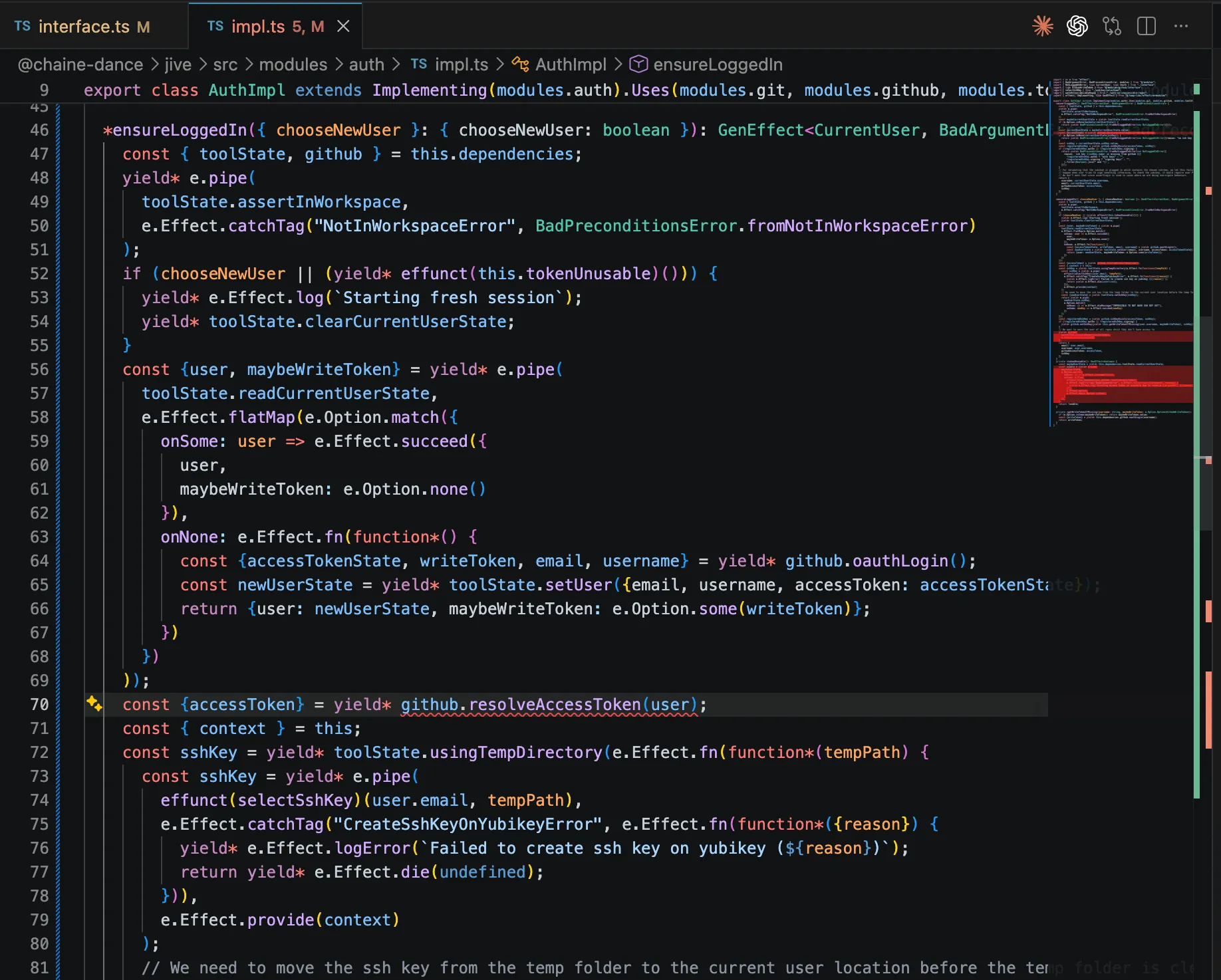
Let’s see this in action in our Todo example where we’ll yield an unexpected error from the validateTokenOrError method.
Before
export const const TodosLive: Layer.Layer<Modules.Todos, never, Modules.Users | Modules.Database>TodosLive = import LayerLayer.const effect: <Modules.Todos, ITodos, never, Modules.Users | Modules.Database>(tag: Tag<Modules.Todos, ITodos>, effect: Effect.Effect<ITodos, never, Modules.Users | Modules.Database>) => Layer.Layer<Modules.Todos, never, Modules.Users | Modules.Database> (+1 overload)Constructs a layer from the specified effect.
effect(
const Todos: Tag<Modules.Todos, ITodos>Todos,
Effect.gen(function*() { const const users: IUsersusers = yield* const Users: Tag<Modules.Users, IUsers>Users;
const const db: IDatabasedb = yield* const Database: Tag<Modules.Database, IDatabase>Database;
const const TASKS_TABLE: "tasks"TASKS_TABLE = "tasks";
const const validateTokenOrError: (token: string) => Effect.Effect<string, InvalidToken | BadSignature, never>validateTokenOrError = import EffectEffect.const fn: <YieldWrap<Effect.Effect<never, InvalidToken, never>> | YieldWrap<Effect.Effect<never, BadSignature, never>> | YieldWrap<Effect.Effect<any, never, never>>, string, [token: string]>(body: (token: string) => Generator<YieldWrap<Effect.Effect<never, InvalidToken, never>> | YieldWrap<Effect.Effect<never, BadSignature, never>> | YieldWrap<Effect.Effect<any, never, never>>, string, never>) => (token: string) => Effect.Effect<...> (+20 overloads)fn(function*(token: stringtoken: string) {
const const maybeUsername: Option.Option<{
username: string;
}>
const users: IUsersusers.IUsers.validateToken(token: string): Effect.fn.Return<Option.Option<{
username: string;
}>>
token: stringtoken);
if (import OptionOption.const isNone: <{
username: string;
}>(self: Option.Option<{
username: string;
}>) => self is Option.None<{
username: string;
}>
Checks whether an Option represents the absence of a value (None).
isNone(const maybeUsername: Option.Option<{
username: string;
}>
constructor InvalidToken<{}>(args: void): InvalidTokenInvalidToken();
}
if (token: stringtoken.String.length: numberReturns the length of a String object.
length) {
return yield* new constructor BadSignature<{}>(args: void): BadSignatureBadSignature();
}
return const maybeUsername: Option.Some<{
username: string;
}>
Some<{ username: string; }>.value: {
username: string;
}
username: stringusername;
});
return {
getTasks: (token: string) => Effect.Effect<{
id: string;
task: string;
}[], InvalidToken | BadSignature, never>
import EffectEffect.const fn: <YieldWrap<Effect.Effect<string, InvalidToken | BadSignature, never>> | YieldWrap<Effect.Effect<{
key: string;
value: string;
}[], never, never>>, {
id: string;
task: string;
}[], [token: string]>(body: (token: string) => Generator<YieldWrap<Effect.Effect<string, InvalidToken | BadSignature, never>> | YieldWrap<Effect.Effect<{
key: string;
value: string;
}[], never, never>>, {
id: string;
task: string;
}[], never>) => (token: string) => Effect.Effect<...> (+20 overloads)
token: stringtoken) {
const const username: stringusername = yield* const validateTokenOrError: (token: string) => Effect.Effect<string, InvalidToken | BadSignature, never>validateTokenOrError(token: stringtoken);
const const items: {
key: string;
value: string;
}[]
const db: IDatabasedb.IDatabase.getAll(table: string, username: string): Effect.Effect<{
key: string;
value: string;
}[]>
const TASKS_TABLE: "tasks"TASKS_TABLE, const username: stringusername);
return const items: {
key: string;
value: string;
}[]
Array<{ key: string; value: string; }>.map<{
id: string;
task: string;
}>(callbackfn: (value: {
key: string;
value: string;
}, index: number, array: {
key: string;
value: string;
}[]) => {
id: string;
task: string;
}, thisArg?: any): {
id: string;
task: string;
}[]
Calls a defined callback function on each element of an array, and returns an array that contains the results.
map(({key: stringkey, value: stringvalue}) => ({id: stringid: key: stringkey, task: stringtask: value: stringvalue}));
}),
createTask: (token: string, task: string) => Effect.Effect<{
id: string;
task: string;
}, InvalidToken | BadSignature, never>
import EffectEffect.const fn: <YieldWrap<Effect.Effect<any, never, never>> | YieldWrap<Effect.Effect<string, InvalidToken | BadSignature, never>>, {
id: string;
task: string;
}, [token: string, task: string]>(body: (token: string, task: string) => Generator<YieldWrap<Effect.Effect<any, never, never>> | YieldWrap<Effect.Effect<string, InvalidToken | BadSignature, never>>, {
id: string;
task: string;
}, never>) => (token: string, task: string) => Effect.Effect<...> (+20 overloads)
token: stringtoken, task: stringtask) {
const const username: stringusername = yield* const validateTokenOrError: (token: string) => Effect.Effect<string, InvalidToken | BadSignature, never>validateTokenOrError(token: stringtoken);
const { const key: stringkey } = yield* const db: IDatabasedb.IDatabase.set(table: string, username: string, value: string, key?: string): Effect.fn.Return<{
key: string;
}>
const TASKS_TABLE: "tasks"TASKS_TABLE, const username: stringusername, task: stringtask);
return {id: stringid: const key: stringkey, task: stringtask};
}),
completeTask: (token: string, id: string) => Effect.Effect<undefined, InvalidToken | BadSignature | NoSuchTask, never>completeTask: import EffectEffect.const fn: <YieldWrap<Effect.Effect<any, never, never>> | YieldWrap<Effect.Effect<string, InvalidToken | BadSignature, never>> | YieldWrap<Effect.Effect<never, NoSuchTask, never>>, undefined, [token: string, id: string]>(body: (token: string, id: string) => Generator<YieldWrap<Effect.Effect<any, never, never>> | YieldWrap<Effect.Effect<string, InvalidToken | BadSignature, never>> | YieldWrap<...>, undefined, never>) => (token: string, id: string) => Effect.Effect<...> (+20 overloads)fn(function* (token: stringtoken, id: stringid) {
const const username: stringusername = yield* const validateTokenOrError: (token: string) => Effect.Effect<string, InvalidToken | BadSignature, never>validateTokenOrError(token: stringtoken);
const const exists: booleanexists = import OptionOption.const isSome: <string>(self: Option.Option<string>) => self is Option.Some<string>Checks whether an Option contains a value (Some).
isSome(yield* const db: IDatabasedb.IDatabase.get(table: string, username: string, key: string): Effect.fn.Return<Option.Option<string>>get(const TASKS_TABLE: "tasks"TASKS_TABLE, const username: stringusername, id: stringid));
if (!const exists: booleanexists) return yield* new constructor NoSuchTask<{}>(args: void): NoSuchTaskNoSuchTask();
yield* const db: IDatabasedb.IDatabase.delete(table: string, username: string, key: string): Effect.fn.Return<void>delete(const TASKS_TABLE: "tasks"TASKS_TABLE, const username: stringusername, id: stringid);
})
};
})
)After
import { const implementing: <Module extends Tag<any, any>>(module: Module) => ModuleSuperClass<Module, None, None>implementing, type type EffectGen<A, E = never, R = never> = Generator<YieldWrap<Effect.Effect<any, E, R>>, A, any>EffectGen } from "effective-modules";
export class class TodosImplTodosImpl extends implementing<Tag<Modules.Todos, ITodos>>(module: Tag<Modules.Todos, ITodos>): ModuleSuperClass<Tag<Modules.Todos, ITodos>, None, None>implementing(const Todos: Tag<Modules.Todos, ITodos>Todos).uses: <Tag<Modules.Database, IDatabase>, [Tag<Modules.Users, IUsers>]>(first: Tag<Modules.Database, IDatabase>, others_0: Tag<Modules.Users, IUsers>) => ModuleSuperClass<Tag<Modules.Todos, ITodos>, Some<[Tag<Modules.Database, IDatabase>, Tag<Modules.Users, IUsers>]>, None>uses(const Database: Tag<Modules.Database, IDatabase>Database, const Users: Tag<Modules.Users, IUsers>Users) implements ITodos {
private static readonly TodosImpl.TASKS_TABLE: "tasks"TASKS_TABLE = "tasks";
*TodosImpl.getTasks(token: string): EffectGen<{
task: string;
id: string;
}[], InvalidToken>
token: stringtoken: string): type EffectGen<A, E = never, R = never> = Generator<YieldWrap<Effect.Effect<any, E, R>>, A, any>EffectGen<{ task: stringtask: string; id: stringid: string; }[], class InvalidTokenInvalidToken> {
const const username: stringusername = yield* this.TodosImpl.validateTokenOrError(token: string): EffectGen<string, InvalidToken>validateTokenOrError(token: stringtoken);
const const items: {
key: string;
value: string;
}[]
dependencies: {
readonly Database: IDatabase;
readonly Users: IUsers;
}
type Database: IDatabaseDatabase.IDatabase.getAll(table: string, username: string): Effect.fn.Return<{
key: string;
value: string;
}[]>
class TodosImplTodosImpl.TodosImpl.TASKS_TABLE: "tasks"TASKS_TABLE, const username: stringusername
);
return const items: {
key: string;
value: string;
}[]
Array<{ key: string; value: string; }>.map<{
id: string;
task: string;
}>(callbackfn: (value: {
key: string;
value: string;
}, index: number, array: {
key: string;
value: string;
}[]) => {
id: string;
task: string;
}, thisArg?: any): {
id: string;
task: string;
}[]
Calls a defined callback function on each element of an array, and returns an array that contains the results.
map(({key: stringkey, value: stringvalue}) => ({id: stringid: key: stringkey, task: stringtask: value: stringvalue}));
}
*TodosImpl.createTask(token: string, task: string): EffectGen<{
task: string;
id: string;
}, InvalidToken>
token: stringtoken: string, task: stringtask: string): type EffectGen<A, E = never, R = never> = Generator<YieldWrap<Effect.Effect<any, E, R>>, A, any>EffectGen<{ task: stringtask: string; id: stringid: string; }, class InvalidTokenInvalidToken> {
const const username: stringusername = yield* this.TodosImpl.validateTokenOrError(token: string): EffectGen<string, InvalidToken>validateTokenOrError(token: stringtoken);
const { const key: stringkey } = yield* this.dependencies: {
readonly Database: IDatabase;
readonly Users: IUsers;
}
type Database: IDatabaseDatabase.IDatabase.set(table: string, username: string, value: string, key?: string): Effect.fn.Return<{
key: string;
}>
class TodosImplTodosImpl.TodosImpl.TASKS_TABLE: "tasks"TASKS_TABLE, const username: stringusername, task: stringtask
);
return {id: stringid: const key: stringkey, task: stringtask};
}
*TodosImpl.completeTask(token: string, id: string): EffectGen<void, NoSuchTask | InvalidToken>completeTask(token: stringtoken: string, id: stringid: string): type EffectGen<A, E = never, R = never> = Generator<YieldWrap<Effect.Effect<any, E, R>>, A, any>EffectGen<void, class NoSuchTaskNoSuchTask | class InvalidTokenInvalidToken> {
const const username: stringusername = yield* this.TodosImpl.validateTokenOrError(token: string): EffectGen<string, InvalidToken>validateTokenOrError(token: stringtoken);
const const exists: booleanexists = import OptionOption.const isSome: <string>(self: Option.Option<string>) => self is Option.Some<string>Checks whether an Option contains a value (Some).
isSome(yield* this.dependencies: {
readonly Database: IDatabase;
readonly Users: IUsers;
}
type Database: IDatabaseDatabase.IDatabase.get(table: string, username: string, key: string): Effect.fn.Return<Option.Option<string>>get(
class TodosImplTodosImpl.TodosImpl.TASKS_TABLE: "tasks"TASKS_TABLE, const username: stringusername, id: stringid
));
if (!const exists: booleanexists) return yield* new constructor NoSuchTask<{}>(args: void): NoSuchTaskNoSuchTask();
yield* this.dependencies: {
readonly Database: IDatabase;
readonly Users: IUsers;
}
type Database: IDatabaseDatabase.IDatabase.delete(table: string, username: string, key: string): Effect.fn.Return<void>delete(
class TodosImplTodosImpl.TodosImpl.TASKS_TABLE: "tasks"TASKS_TABLE, const username: stringusername, id: stringid
);
}
private *TodosImpl.validateTokenOrError(token: string): EffectGen<string, InvalidToken>validateTokenOrError(token: stringtoken: string): type EffectGen<A, E = never, R = never> = Generator<YieldWrap<Effect.Effect<any, E, R>>, A, any>EffectGen<string, class InvalidTokenInvalidToken> {
const const maybeUsername: Option.Option<{
username: string;
}>
dependencies: {
readonly Database: IDatabase;
readonly Users: IUsers;
}
type Users: IUsersUsers.IUsers.validateToken(token: string): Effect.fn.Return<Option.Option<{
username: string;
}>>
token: stringtoken);
if (import OptionOption.const isNone: <{
username: string;
}>(self: Option.Option<{
username: string;
}>) => self is Option.None<{
username: string;
}>
Checks whether an Option represents the absence of a value (None).
isNone(const maybeUsername: Option.Option<{
username: string;
}>
constructor InvalidToken<{}>(args: void): InvalidTokenInvalidToken();
}
if (token: stringtoken.String.length: numberReturns the length of a String object.
length) {
return yield* new BadSignature(); }
return const maybeUsername: Option.Some<{
username: string;
}>
Some<{ username: string; }>.value: {
username: string;
}
username: stringusername;
}
}In Effect’s current canon, the entire layer definition gets marked as invalid, which isn’t helpful when trying to pinpoint issues.
context, dependencies, effunct
As mentioned before, the implementing utility returns an abstract superclass that provides a dependencies structure. The superclass also provides a context structure so you no longer have to repeat yourself when passing dependencies to Effects defined outside of the implementation scope. Revisiting our earlier example we now have
Before
const const helperFn: (someInput: number) => Effect.Effect<string, never, ServiceOne>helperFn = import EffectEffect.const fn: <YieldWrap<Context.Tag<ServiceOne, {
serviceOneMethod(someInput: number): Effect.Effect<string, never, never>;
}>> | YieldWrap<Effect.Effect<string, never, never>>, string, [someInput: number]>(body: (someInput: number) => Generator<YieldWrap<Context.Tag<ServiceOne, {
serviceOneMethod(someInput: number): Effect.Effect<string, never, never>;
}>> | YieldWrap<Effect.Effect<string, never, never>>, string, never>) => (someInput: number) => Effect.Effect<...> (+20 overloads)
someInput: numbersomeInput: number) {
const const serviceOne: {
serviceOneMethod(someInput: number): Effect.Effect<string, never, never>;
}
class ServiceOneServiceOne;
const const serviceOneResult: stringserviceOneResult = yield* const serviceOne: {
serviceOneMethod(someInput: number): Effect.Effect<string, never, never>;
}
function serviceOneMethod(someInput: number): Effect.Effect<string, never, never>serviceOneMethod(someInput: numbersomeInput);
// Do something complex with result before returning it.
const const complexResult: stringcomplexResult = const serviceOneResult: stringserviceOneResult;
return const complexResult: stringcomplexResult;
});
const const ServiceTwoImpl: Layer.Layer<ServiceTwo, never, ServiceOne>ServiceTwoImpl = import LayerLayer.const effect: <ServiceTwo, {
serviceTwoMethod(someInput: number): Effect.Effect<string, never, never>;
}, never, ServiceOne>(tag: Context.Tag<ServiceTwo, {
serviceTwoMethod(someInput: number): Effect.Effect<string, never, never>;
}>, effect: Effect.Effect<{
serviceTwoMethod(someInput: number): Effect.Effect<string, never, never>;
}, never, ServiceOne>) => Layer.Layer<ServiceTwo, never, ServiceOne> (+1 overload)
Constructs a layer from the specified effect.
effect(class ServiceTwoServiceTwo, import EffectEffect.const gen: <YieldWrap<Context.Tag<ServiceOne, {
serviceOneMethod(someInput: number): Effect.Effect<string, never, never>;
}>>, {
serviceTwoMethod: (someInput: number) => Effect.Effect<string, never, never>;
}>(f: (resume: Effect.Adapter) => Generator<YieldWrap<Context.Tag<ServiceOne, {
serviceOneMethod(someInput: number): Effect.Effect<string, never, never>;
}>>, {
serviceTwoMethod: (someInput: number) => Effect.Effect<string, never, never>;
}, never>) => Effect.Effect<...> (+1 overload)
Provides a way to write effectful code using generator functions, simplifying
control flow and error handling.
When to Use
Effect.gen allows you to write code that looks and behaves like synchronous
code, but it can handle asynchronous tasks, errors, and complex control flow
(like loops and conditions). It helps make asynchronous code more readable
and easier to manage.
The generator functions work similarly to async/await but with more
explicit control over the execution of effects. You can yield* values from
effects and return the final result at the end.
Example
import { Effect } from "effect"
const addServiceCharge = (amount: number) => amount + 1
const applyDiscount = (
total: number,
discountRate: number
): Effect.Effect<number, Error> =>
discountRate === 0
? Effect.fail(new Error("Discount rate cannot be zero"))
: Effect.succeed(total - (total * discountRate) / 100)
const fetchTransactionAmount = Effect.promise(() => Promise.resolve(100))
const fetchDiscountRate = Effect.promise(() => Promise.resolve(5))
export const program = Effect.gen(function* () {
const transactionAmount = yield* fetchTransactionAmount
const discountRate = yield* fetchDiscountRate
const discountedAmount = yield* applyDiscount(
transactionAmount,
discountRate
)
const finalAmount = addServiceCharge(discountedAmount)
return `Final amount to charge: ${finalAmount}`
})
gen(function*() {
const const serviceOne: {
serviceOneMethod(someInput: number): Effect.Effect<string, never, never>;
}
class ServiceOneServiceOne;
// Need to create context manually
const const context: Context.Context<ServiceOne>context = pipe<Context.Context<never>, Context.Context<ServiceOne>>(a: Context.Context<never>, ab: (a: Context.Context<never>) => Context.Context<ServiceOne>): Context.Context<ServiceOne> (+19 overloads)Pipes the value of an expression into a pipeline of functions.
Details
The pipe function is a utility that allows us to compose functions in a
readable and sequential manner. It takes the output of one function and
passes it as the input to the next function in the pipeline. This enables us
to build complex transformations by chaining multiple functions together.
import { pipe } from "effect"
const result = pipe(input, func1, func2, ..., funcN)
In this syntax, input is the initial value, and func1, func2, ...,
funcN are the functions to be applied in sequence. The result of each
function becomes the input for the next function, and the final result is
returned.
Here's an illustration of how pipe works:
┌───────┐ ┌───────┐ ┌───────┐ ┌───────┐ ┌───────┐ ┌────────┐
│ input │───►│ func1 │───►│ func2 │───►│ ... │───►│ funcN │───►│ result │
└───────┘ └───────┘ └───────┘ └───────┘ └───────┘ └────────┘
It's important to note that functions passed to pipe must have a single
argument because they are only called with a single argument.
When to Use
This is useful in combination with data-last functions as a simulation of
methods:
as.map(f).filter(g)
becomes:
import { pipe, Array } from "effect"
pipe(as, Array.map(f), Array.filter(g))
Example (Chaining Arithmetic Operations)
import { pipe } from "effect"
// Define simple arithmetic operations
const increment = (x: number) => x + 1
const double = (x: number) => x * 2
const subtractTen = (x: number) => x - 10
// Sequentially apply these operations using `pipe`
const result = pipe(5, increment, double, subtractTen)
console.log(result)
// Output: 2
pipe(
import ContextContext.const empty: () => Context.Context<never>Returns an empty Context.
empty(),
import ContextContext.const add: <ServiceOne, {
serviceOneMethod(someInput: number): Effect.Effect<string, never, never>;
}>(tag: Context.Tag<ServiceOne, {
serviceOneMethod(someInput: number): Effect.Effect<string, never, never>;
}>, service: {
serviceOneMethod(someInput: number): Effect.Effect<string, never, never>;
}) => <Services>(self: Context.Context<Services>) => Context.Context<ServiceOne | Services> (+1 overload)
Adds a service to a given Context.
add(class ServiceOneServiceOne, const serviceOne: {
serviceOneMethod(someInput: number): Effect.Effect<string, never, never>;
}
serviceTwoMethod: (someInput: number) => Effect.Effect<string, never, never>serviceTwoMethod: import EffectEffect.const fn: <YieldWrap<Effect.Effect<string, never, never>>, string, [someInput: number]>(body: (someInput: number) => Generator<YieldWrap<Effect.Effect<string, never, never>>, string, never>) => (someInput: number) => Effect.Effect<string, never, never> (+20 overloads)fn(function*(someInput: numbersomeInput) {
return yield* pipe<Effect.Effect<string, never, ServiceOne>, Effect.Effect<string, never, never>>(a: Effect.Effect<string, never, ServiceOne>, ab: (a: Effect.Effect<string, never, ServiceOne>) => Effect.Effect<string, never, never>): Effect.Effect<string, never, never> (+19 overloads)Pipes the value of an expression into a pipeline of functions.
Details
The pipe function is a utility that allows us to compose functions in a
readable and sequential manner. It takes the output of one function and
passes it as the input to the next function in the pipeline. This enables us
to build complex transformations by chaining multiple functions together.
import { pipe } from "effect"
const result = pipe(input, func1, func2, ..., funcN)
In this syntax, input is the initial value, and func1, func2, ...,
funcN are the functions to be applied in sequence. The result of each
function becomes the input for the next function, and the final result is
returned.
Here's an illustration of how pipe works:
┌───────┐ ┌───────┐ ┌───────┐ ┌───────┐ ┌───────┐ ┌────────┐
│ input │───►│ func1 │───►│ func2 │───►│ ... │───►│ funcN │───►│ result │
└───────┘ └───────┘ └───────┘ └───────┘ └───────┘ └────────┘
It's important to note that functions passed to pipe must have a single
argument because they are only called with a single argument.
When to Use
This is useful in combination with data-last functions as a simulation of
methods:
as.map(f).filter(g)
becomes:
import { pipe, Array } from "effect"
pipe(as, Array.map(f), Array.filter(g))
Example (Chaining Arithmetic Operations)
import { pipe } from "effect"
// Define simple arithmetic operations
const increment = (x: number) => x + 1
const double = (x: number) => x * 2
const subtractTen = (x: number) => x - 10
// Sequentially apply these operations using `pipe`
const result = pipe(5, increment, double, subtractTen)
console.log(result)
// Output: 2
pipe(
const helperFn: (someInput: number) => Effect.Effect<string, never, ServiceOne>helperFn(someInput: numbersomeInput),
import EffectEffect.const provide: <ServiceOne>(context: Context.Context<ServiceOne>) => <A, E, R>(self: Effect.Effect<A, E, R>) => Effect.Effect<A, E, Exclude<R, ServiceOne>> (+9 overloads)Provides necessary dependencies to an effect, removing its environmental
requirements.
Details
This function allows you to supply the required environment for an effect.
The environment can be provided in the form of one or more Layers, a
Context, a Runtime, or a ManagedRuntime. Once the environment is
provided, the effect can run without requiring external dependencies.
You can compose layers to create a modular and reusable way of setting up the
environment for effects. For example, layers can be used to configure
databases, logging services, or any other required dependencies.
Example
import { Context, Effect, Layer } from "effect"
class Database extends Context.Tag("Database")<
Database,
{ readonly query: (sql: string) => Effect.Effect<Array<unknown>> }
>() {}
const DatabaseLive = Layer.succeed(
Database,
{
// Simulate a database query
query: (sql: string) => Effect.log(`Executing query: ${sql}`).pipe(Effect.as([]))
}
)
// ┌─── Effect<unknown[], never, Database>
// ▼
const program = Effect.gen(function*() {
const database = yield* Database
const result = yield* database.query("SELECT * FROM users")
return result
})
// ┌─── Effect<unknown[], never, never>
// ▼
const runnable = Effect.provide(program, DatabaseLive)
Effect.runPromise(runnable).then(console.log)
// Output:
// timestamp=... level=INFO fiber=#0 message="Executing query: SELECT * FROM users"
// []
provide(const context: Context.Context<ServiceOne>context)
);
})
}
}));After
import { const effunct: <EffectGeneratorFn extends (...args: any) => Effect.fn.Return<any, any, any>>(generatorFn: EffectGeneratorFn) => (...args: Parameters<EffectGeneratorFn>) => GeneratedEffect<ReturnType<EffectGeneratorFn>>effunct } from "effective-modules";
class class ServiceTwoImplServiceTwoImpl extends implementing<Context.Tag<Modules.ServiceTwo, IServiceTwo>>(module: Context.Tag<Modules.ServiceTwo, IServiceTwo>): ModuleSuperClass<Context.Tag<Modules.ServiceTwo, IServiceTwo>, None, None>implementing(const modules: {
ServiceOne: Context.Tag<Modules.ServiceOne, IServiceOne>;
ServiceTwo: Context.Tag<Modules.ServiceTwo, IServiceTwo>;
}
type ServiceTwo: Context.Tag<Modules.ServiceTwo, IServiceTwo>ServiceTwo).uses: <Context.Tag<Modules.ServiceOne, IServiceOne>, []>(first: Context.Tag<Modules.ServiceOne, IServiceOne>) => ModuleSuperClass<Context.Tag<Modules.ServiceTwo, IServiceTwo>, Some<[Context.Tag<Modules.ServiceOne, IServiceOne>]>, None>uses(const modules: {
ServiceOne: Context.Tag<Modules.ServiceOne, IServiceOne>;
ServiceTwo: Context.Tag<Modules.ServiceTwo, IServiceTwo>;
}
type ServiceOne: Context.Tag<Modules.ServiceOne, IServiceOne>ServiceOne) implements IServiceTwo {
*ServiceTwoImpl.serviceTwoMethod(someInput: number): EffectGen<string, never, never>serviceTwoMethod(someInput: numbersomeInput: number): type EffectGen<A, E = never, R = never> = Generator<YieldWrap<Effect.Effect<any, E, R>>, A, any>EffectGen<string, never, never> {
return yield* pipe<Effect.Effect<string, never, Modules.ServiceOne>, Effect.Effect<string, never, never>>(a: Effect.Effect<string, never, Modules.ServiceOne>, ab: (a: Effect.Effect<string, never, Modules.ServiceOne>) => Effect.Effect<string, never, never>): Effect.Effect<string, never, never> (+19 overloads)Pipes the value of an expression into a pipeline of functions.
Details
The pipe function is a utility that allows us to compose functions in a
readable and sequential manner. It takes the output of one function and
passes it as the input to the next function in the pipeline. This enables us
to build complex transformations by chaining multiple functions together.
import { pipe } from "effect"
const result = pipe(input, func1, func2, ..., funcN)
In this syntax, input is the initial value, and func1, func2, ...,
funcN are the functions to be applied in sequence. The result of each
function becomes the input for the next function, and the final result is
returned.
Here's an illustration of how pipe works:
┌───────┐ ┌───────┐ ┌───────┐ ┌───────┐ ┌───────┐ ┌────────┐
│ input │───►│ func1 │───►│ func2 │───►│ ... │───►│ funcN │───►│ result │
└───────┘ └───────┘ └───────┘ └───────┘ └───────┘ └────────┘
It's important to note that functions passed to pipe must have a single
argument because they are only called with a single argument.
When to Use
This is useful in combination with data-last functions as a simulation of
methods:
as.map(f).filter(g)
becomes:
import { pipe, Array } from "effect"
pipe(as, Array.map(f), Array.filter(g))
Example (Chaining Arithmetic Operations)
import { pipe } from "effect"
// Define simple arithmetic operations
const increment = (x: number) => x + 1
const double = (x: number) => x * 2
const subtractTen = (x: number) => x - 10
// Sequentially apply these operations using `pipe`
const result = pipe(5, increment, double, subtractTen)
console.log(result)
// Output: 2
pipe(
effunct<(someInput: number) => EffectGen<string, never, Modules.ServiceOne>>(generatorFn: (someInput: number) => EffectGen<string, never, Modules.ServiceOne>): (someInput: number) => Effect.Effect<string, never, Modules.ServiceOne>effunct(this.ServiceTwoImpl.helperFn(someInput: number): EffectGen<string, never, Modules.ServiceOne>helperFn)(someInput: numbersomeInput),
import EffectEffect.const provide: <Modules.ServiceOne>(context: Context.Context<Modules.ServiceOne>) => <A, E, R>(self: Effect.Effect<A, E, R>) => Effect.Effect<A, E, Exclude<R, Modules.ServiceOne>> (+9 overloads)Provides necessary dependencies to an effect, removing its environmental
requirements.
Details
This function allows you to supply the required environment for an effect.
The environment can be provided in the form of one or more Layers, a
Context, a Runtime, or a ManagedRuntime. Once the environment is
provided, the effect can run without requiring external dependencies.
You can compose layers to create a modular and reusable way of setting up the
environment for effects. For example, layers can be used to configure
databases, logging services, or any other required dependencies.
Example
import { Context, Effect, Layer } from "effect"
class Database extends Context.Tag("Database")<
Database,
{ readonly query: (sql: string) => Effect.Effect<Array<unknown>> }
>() {}
const DatabaseLive = Layer.succeed(
Database,
{
// Simulate a database query
query: (sql: string) => Effect.log(`Executing query: ${sql}`).pipe(Effect.as([]))
}
)
// ┌─── Effect<unknown[], never, Database>
// ▼
const program = Effect.gen(function*() {
const database = yield* Database
const result = yield* database.query("SELECT * FROM users")
return result
})
// ┌─── Effect<unknown[], never, never>
// ▼
const runnable = Effect.provide(program, DatabaseLive)
Effect.runPromise(runnable).then(console.log)
// Output:
// timestamp=... level=INFO fiber=#0 message="Executing query: SELECT * FROM users"
// []
provide(this.context: Context.Context<Modules.ServiceOne>context)
);
}
private *ServiceTwoImpl.helperFn(someInput: number): EffectGen<string, never, Modules.ServiceOne>helperFn(someInput: numbersomeInput: number): type EffectGen<A, E = never, R = never> = Generator<YieldWrap<Effect.Effect<any, E, R>>, A, any>EffectGen<string, never, enum ModulesModules.function (enum member) Modules.ServiceOne = "ServiceOne"ServiceOne> {
const const serviceOne: IServiceOneserviceOne = yield* const modules: {
ServiceOne: Context.Tag<Modules.ServiceOne, IServiceOne>;
ServiceTwo: Context.Tag<Modules.ServiceTwo, IServiceTwo>;
}
type ServiceOne: Context.Tag<Modules.ServiceOne, IServiceOne>ServiceOne;
const const serviceOneResult: stringserviceOneResult = yield* const serviceOne: IServiceOneserviceOne.IServiceOne.serviceOneMethod(someInput: number): Effect.fn.Return<string, never, never>serviceOneMethod(someInput: numbersomeInput);
// Do something complex with result before returning it.
const const complexResult: stringcomplexResult = const serviceOneResult: stringserviceOneResult;
return const complexResult: stringcomplexResult;
}
}A little less repetition, keeping the code more focused.
Something to note is a friction point that Effective Modules introduces by yielding generators directly. While directly yielding an Effect Generator will properly return values, bubble up errors, and propagate requirements up the Effect call stack, the Generator itself is not an Effect, so you cannot directly pipe it to methods such as Effect.provide. Effective Modules offers the effunct utility to wrap generator functions such that they return an Effect when called. You could also just use Effect.fn, but effunct automatically passes the generator function’s name into Effect.fn, enabling tracing (Effect.fn(generatorFn.name)(generatorFn)). No need to worry about binding the method before passing it into effunct, the implementing superclass takes care of that by autobinding all instance methods.
Custom Initializer
To allow for complex initialization behavior, one can pass a generator function to the super call on class construction and (optionally) add a throws clause to the superclass to specify an error channel.
import { type type Initialize<Module extends { Layer: Layer<any, any, any>; new (): {} | { dependencies: any; }; }> = Module["Layer"] extends Layer.Layer<any, infer Error, infer Requirements> ? InstanceType<Module> extends {
dependencies: any;
} ? Effect.fn.Return<InstanceType<Module>["dependencies"], Error, Requirements> : Effect.fn.Return<void, Error, Requirements> : never
class InitializationErrorInitializationError extends import DataData.const TaggedError: <"InitializationError">(tag: "InitializationError") => new <A>(args: VoidIfEmpty<{ readonly [P in keyof A as P extends "_tag" ? never : P]: A[P]; }>) => YieldableError & {
readonly _tag: "InitializationError";
} & Readonly<A>
class MyModuleImplMyModuleImpl extends implementing<Context.Tag<Modules.MyModule, IMyModule>>(module: Context.Tag<Modules.MyModule, IMyModule>): ModuleSuperClass<Context.Tag<Modules.MyModule, IMyModule>, None, None>implementing(const MyModule: Context.Tag<Modules.MyModule, IMyModule>MyModule).uses: <Context.Tag<Modules.OtherModule, IOtherModule>, []>(first: Context.Tag<Modules.OtherModule, IOtherModule>) => ModuleSuperClass<Context.Tag<Modules.MyModule, IMyModule>, Some<[Context.Tag<Modules.OtherModule, IOtherModule>]>, None>uses(const OtherModule: Context.Tag<Modules.OtherModule, IOtherModule>OtherModule).throws: <InitializationError>() => ModuleSuperClass<Context.Tag<Modules.MyModule, IMyModule>, Some<[Context.Tag<Modules.OtherModule, IOtherModule>]>, Some<InitializationError>>throws<class InitializationErrorInitializationError>() implements IMyModule {
constructor() {
super(function*(): type Initialize<Module extends { Layer: Layer<any, any, any>; new (): {} | { dependencies: any; }; }> = Module["Layer"] extends Layer.Layer<any, infer Error, infer Requirements> ? InstanceType<Module> extends {
dependencies: any;
} ? Effect.fn.Return<InstanceType<Module>["dependencies"], Error, Requirements> : Effect.fn.Return<void, Error, Requirements> : never
class MyModuleImplMyModuleImpl> {
if (var Math: MathAn intrinsic object that provides basic mathematics functionality and constants.
Math.Math.random(): numberReturns a pseudorandom number between 0 and 1.
random() > .5) {
yield* new constructor InitializationError<{}>(args: void): InitializationErrorInitializationError();
}
return {
type OtherModule: IOtherModuleOtherModule: yield* const OtherModule: Context.Tag<Modules.OtherModule, IOtherModule>OtherModule
}
})
}
}
class MyModuleImplMyModuleImpl.type Layer: Layer.Layer<Modules.MyModule, InitializationError, Modules.OtherModule>Layer
When creating a custom initializer you need to yield and return the dependencies object manually. There’ll be a type error if any dependency specified in uses is missing from the returned object, or if the resulting error or requirements channel does not match what was passed to uses and throws.
import { type type Initialize<Module extends { Layer: Layer<any, any, any>; new (): {} | { dependencies: any; }; }> = Module["Layer"] extends Layer.Layer<any, infer Error, infer Requirements> ? InstanceType<Module> extends {
dependencies: any;
} ? Effect.fn.Return<InstanceType<Module>["dependencies"], Error, Requirements> : Effect.fn.Return<void, Error, Requirements> : never
class InitializationErrorInitializationError extends import DataData.const TaggedError: <"InitializationError">(tag: "InitializationError") => new <A>(args: VoidIfEmpty<{ readonly [P in keyof A as P extends "_tag" ? never : P]: A[P]; }>) => YieldableError & {
readonly _tag: "InitializationError";
} & Readonly<A>
class MyModuleImplMyModuleImpl extends implementing<Context.Tag<Modules.MyModule, IMyModule>>(module: Context.Tag<Modules.MyModule, IMyModule>): ModuleSuperClass<Context.Tag<Modules.MyModule, IMyModule>, None, None>implementing(const MyModule: Context.Tag<Modules.MyModule, IMyModule>MyModule).uses: <Context.Tag<Modules.OtherModule, IOtherModule>, []>(first: Context.Tag<Modules.OtherModule, IOtherModule>) => ModuleSuperClass<Context.Tag<Modules.MyModule, IMyModule>, Some<[Context.Tag<Modules.OtherModule, IOtherModule>]>, None>uses(const OtherModule: Context.Tag<Modules.OtherModule, IOtherModule>OtherModule).throws: <InitializationError>() => ModuleSuperClass<Context.Tag<Modules.MyModule, IMyModule>, Some<[Context.Tag<Modules.OtherModule, IOtherModule>]>, Some<InitializationError>>throws<class InitializationErrorInitializationError>() implements IMyModule {
constructor() {
super(function*(): type Initialize<Module extends { Layer: Layer<any, any, any>; new (): {} | { dependencies: any; }; }> = Module["Layer"] extends Layer.Layer<any, infer Error, infer Requirements> ? InstanceType<Module> extends {
dependencies: any;
} ? Effect.fn.Return<InstanceType<Module>["dependencies"], Error, Requirements> : Effect.fn.Return<void, Error, Requirements> : never
class MyModuleImplMyModuleImpl> {
yield* MyModule; if (var Math: MathAn intrinsic object that provides basic mathematics functionality and constants.
Math.Math.random(): numberReturns a pseudorandom number between 0 and 1.
random() > .5) {
return yield* new constructor InitializationError<{}>(args: void): InitializationErrorInitializationError();
}
if (var Math: MathAn intrinsic object that provides basic mathematics functionality and constants.
Math.Math.random(): numberReturns a pseudorandom number between 0 and 1.
random() > .1) {
return yield* new UnexpectedError(); }
return {
OtherModule: 2 }
})
}
}Wishlist
That’s basically it for Effective Modules. It’s just a thin wrapper around Effect that makes your code feel a bit more sane.
Here’s a list of changes I wish would land in TypeScript and Effect so Effective Modules code could be even cleaner still.
key type in Effect Platform Services
The dependencies object works well for services which a developer manually defines because v3’s Context.Tag and v4’s Context.Service creates a ServiceClass instance which captures the key literal as a generic, while Effective modules uses the string enum member as both the Self and key types. But this dependencies construct falls apart (becomes untyped) for Effect Platform services because these extend from the base Tag/Service type which does not take in a generic key / Identifier and instead types this field to string. For those cases Effective Modules falls back to a runtime error if the key is missing from a custom initializer return, and a this.getDependency utility is provided to get dependency by tag.
class class NonMigratedModuleNonMigratedModule extends import ContextContext.const Tag: <"NonMigrated">(id: "NonMigrated") => <Self, Shape>() => Context.TagClass<Self, "NonMigrated", Shape>Tag("NonMigrated")<class NonMigratedModuleNonMigratedModule, INonMigratedModule>() {}
import { import FileSystemFileSystem } from "@effect/platform";
class class MyModuleImplMyModuleImpl extends implementing<Context.Tag<Modules.MyModule, IMyModule>>(module: Context.Tag<Modules.MyModule, IMyModule>): ModuleSuperClass<Context.Tag<Modules.MyModule, IMyModule>, None, None>implementing(const MyModule: Context.Tag<Modules.MyModule, IMyModule>MyModule).uses: <Context.Tag<FileSystem.FileSystem, FileSystem.FileSystem>, [typeof NonMigratedModule]>(first: Context.Tag<FileSystem.FileSystem, FileSystem.FileSystem>, others_0: typeof NonMigratedModule) => ModuleSuperClass<Context.Tag<Modules.MyModule, IMyModule>, Some<[Context.Tag<FileSystem.FileSystem, FileSystem.FileSystem>, typeof NonMigratedModule]>, None>uses(import FileSystemFileSystem.const FileSystem: Context.Tag<FileSystem.FileSystem, FileSystem.FileSystem>FileSystem, class NonMigratedModuleNonMigratedModule) implements IMyModule {
constructor() {
super(function*(): type Initialize<Module extends { Layer: Layer<any, any, any>; new (): {} | { dependencies: any; }; }> = Module["Layer"] extends Layer<any, infer Error, infer Requirements> ? InstanceType<Module> extends {
dependencies: any;
} ? Effect.fn.Return<InstanceType<Module>["dependencies"], Error, Requirements> : Effect.fn.Return<void, Error, Requirements> : never
class MyModuleImplMyModuleImpl> {
/*
No compile-time error because FileSystem["key"] is string,
but this will cause a runtime error on Layer construction.
In most cases I advise avoiding custom initializers so
Effective Modules can initialize things for you.
*/
return {
type NonMigrated: INonMigratedModuleNonMigrated: yield* class NonMigratedModuleNonMigratedModule,
// The following needs to be added to prevent runtime error
// "@effect/platform/FileSystem": yield* FileSystem.Filesystem
}
})
}
*MyModuleImpl.someMethod(): EffectGen<void>someMethod(): type EffectGen<A, E = never, R = never> = Generator<YieldWrap<Effect.Effect<any, E, R>>, A, any>EffectGen<void> {
this.dependencies: {
readonly NonMigrated: INonMigratedModule;
}
const fs: FileSystem.FileSystemfs = this.getDependency: <Context.Tag<FileSystem.FileSystem, FileSystem.FileSystem>>(dependency: Context.Tag<FileSystem.FileSystem, FileSystem.FileSystem>) => FileSystem.FileSystemgetDependency(import FileSystemFileSystem.const FileSystem: Context.Tag<FileSystem.FileSystem, FileSystem.FileSystem>FileSystem);
// getDependency only works for modules specified in "uses"
this.getDependency: <typeof NonMigratedModule | Context.Tag<FileSystem.FileSystem, FileSystem.FileSystem>>(dependency: typeof NonMigratedModule | Context.Tag<FileSystem.FileSystem, FileSystem.FileSystem>) => INonMigratedModule | FileSystem.FileSystemgetDependency(OtherModule); }
}I propose that ServiceClass / TagClass become the only type for defining services. They canonically have a separate type passed in for the Self parameter and also track the literal for Key, whereas the platform services use the same type for both Self and Shape, making them susceptible to structural-typing-related bugs. That is, a service with a similar enough shape to FileSystem could accidentally substitute it. Ideally all service definitions have an identifying, nominal type and explicitly track a key literal.
If this change is too big an ask, perhaps we could at least have the Effect Platform services be subtypes of ServiceClass rather than the base Service so that they can get an explicit key and ideally a nominal Self, or perhaps move the explicit generic key / Identifier type up into the base Service type definition.
Nominal ADT enums in TypeScript
Effective Modules employed string enums for nominal Self types then needed a separate method to map members to an interface. Ideally though, TypeScript would offer a way to define an Abstract Data Type with nominally typed members.
Before
import { interfaces } from "effective-modules";

export enum Modules {
  Users = "Users",
  Todos = "Todos",
  Database = "Database"
}

export const modules = interfaces<Modules, {
  Users: IUsers;
  Todos: ITodos;
  Database: IDatabase;
}>(Modules);
After
import { interfaces } from "effective-modules";

export enum Modules {
  Users = IUsers,
  Todos = ITodos,
  Database = IDatabase
}

export const modules = interfaces(Modules);
Is this issue the right place to make some noise?
Generators AS Effects
What would be nice is if Effect Generators could be passed around as Effects. This would eliminate the need for syntax like Effect.fn, Effect.gen, effunct, Effect.fn.Return, etc. One could write and call pure generator functions, directly specifying the return type as an Effect.
Before
const helper: Effect<string, SomeError> = gen(function*() {
  if (someCondition)
    return yield* new SomeError();
  return "something";
});

const program: Effect<void> = gen(function*() {
  const value = yield* pipe(
    helper,
    handleSomeError
  );
  yield* log(value);
});
After
function* helper(): Effect<string, SomeError> {
  if (someCondition)
    return yield* new SomeError();
  return "something";
}

function* program(): Effect<void> {
  const value = yield* pipe(
    helper(),
    handleSomeError
  );
  yield* log(value);
}
Which looks cleaner to you? One of the biggest complaints about Effect is how ugly it looks. I think this is how we address that. The after example is basically no more noisy than async await code.
First-class effectful primitives in JavaScript
If we can achieve the above, we could someday get effectful primitives built into the language itself. This mirrors the async await journey: we started with Bluebird’s Promise.coroutine which took a generator function and returned a promise, then this eventually served as a basis for JavaScript’s async and await keywords proposals.
Before
function* helper(): Effect<string, SomeError> {
  if (someCondition)
    return yield* new SomeError();
  return "something";
}

function* program(): Effect<void> {
  const value = yield* pipe(
    helper(),
    handleSomeError
  );
  yield* log(value);
}
After
effectful function helper(): Effect<string, SomeError> {
  if (someCondition)
    resolve new SomeError();
  return "something";
}

effectful function program(): Effect<void> {
  const value = resolve pipe(
    helper(),
    handleSomeError
  );
  resolve log(value);
}
Here I’m imagining a future where keywords like effectful and resolve are part of the JavaScript language, similar to async and await but for effectful code.
Abstractify utility type in TypeScript
Currently TypeScript has no generic way to turn all members of an object type abstract.
interface ITodos {
  getTasks(token: string): EffectGen{task: string; id: string;}[], InvalidToken>
  createTask(token: string, task: string): EffectGen<{task: string; id: string;}, InvalidToken>
  completeTask(token: string, id: string): EffectGen<void, NoSuchTask | InvalidToken>;
}

// Ideally you'd have this
type AbstractITodos = Abstractify<ITodos>

// Which would be equivalent to this
type AbstractITodos = {
  abstract getTasks(token: string): EffectGen{task: string; id: string;}[], InvalidToken>
  abstract createTask(token: string, task: string): EffectGen<{task: string; id: string;}, InvalidToken>
  abstract completeTask(token: string, id: string): EffectGen<void, NoSuchTask | InvalidToken>;
}
The main benefit here would be that you’d no longer need the implements code when declaring a module class. Ideally the interface shape would just be inferred / enforced by the module passed to Effective Modules’ implementing utility.
Before
class TodosImpl extends const implementing: (mod: any) => {
new (): {};
}
const Todos: {
interface: ITodos;
}
After
class TodosImpl extends const implementing: (mod: any) => abstract new () => {
abstract method(): string;
}
const Todos: {
interface: ITodos;
}
I haven’t figured out the most appropriate Github issue to go to with this use-case. Let me know if you find it.
Thoughts?
Drop a comment!